Tuesday, 2 April 2019

17 Charts That Show Where Social Media is Heading

social shares

You already know it’s harder to get traffic from the social web unless you spend money ads.

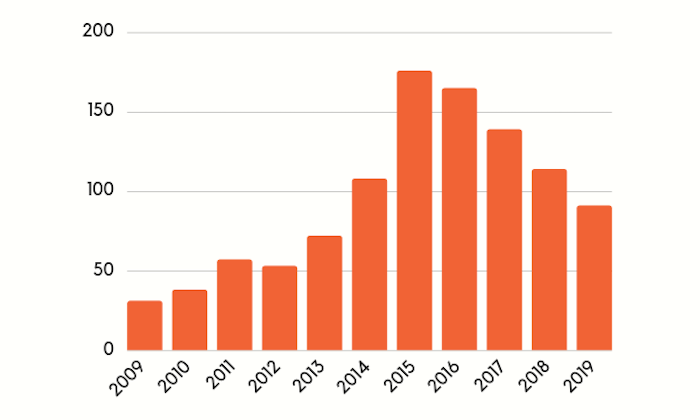
There’s nothing new with that fact… just look at the graph above: It breaks down how the average number of social shares per blog post has been dying year over year.

But the reality is you can’t ignore platforms like Facebook, Twitter, LinkedIn, Instagram, YouTube or any other new contender that comes out and gains traction.

These social sites command so much traffic, that we have no choice but to be on them.

Just look at the Similar Web numbers for Facebook… they get an estimated 19.2 billion visits a month.

That’s ridiculous! And it’s not just Facebook either… according to Similar Web, all of the big platforms get tons of traffic:

  • LinkedIn – 917 million visitors a month
  • Twitter – 3.62 billion visitors a month
  • YouTube – 22.77 billion visitors a month
  • Instagram – 2.86 billion visitors a month

In other words, whether you like their algorithm tweaks or not, you have no choice but to be on these platforms as they attract so many eyeballs.

So, what should you do with your organic social reach? How should you combat their algorithms so you can generate a positive ROI as their ad prices keep going up?

Well, I surveyed 183 companies that generate at least 5 million dollars in revenue a year all the way up to $1.7 billion to show you where social media is headed and what you should do to succeed in the landscape.

Let’s dive into the data…

Expect less traffic from the social web, even if you pay for it

Look at the graph below. What do you see?
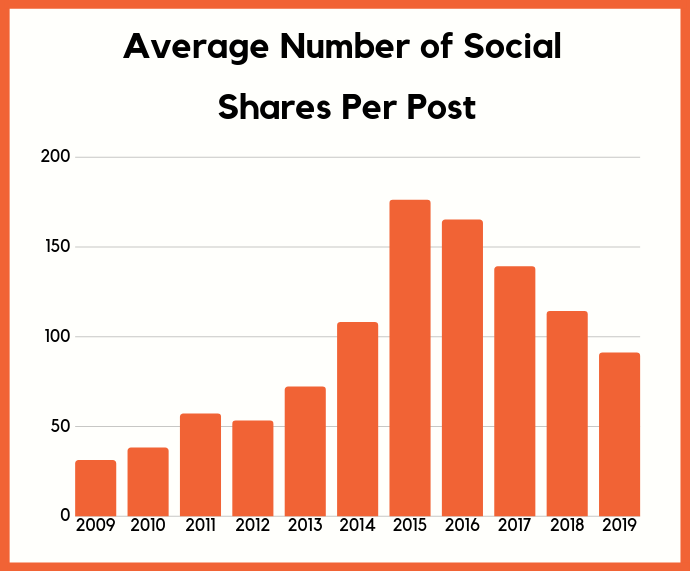
social shares per post

Since 2015, the amount of shares a blog post receives from the social web has been declining. One of the large reasons for social sites to clamp down on organic reach is that that makes it so you need to spend money to get the reach that you were once used to and relied upon to generate traffic.

Now let’s look at the percentage of digital ad spend going towards social media sites.
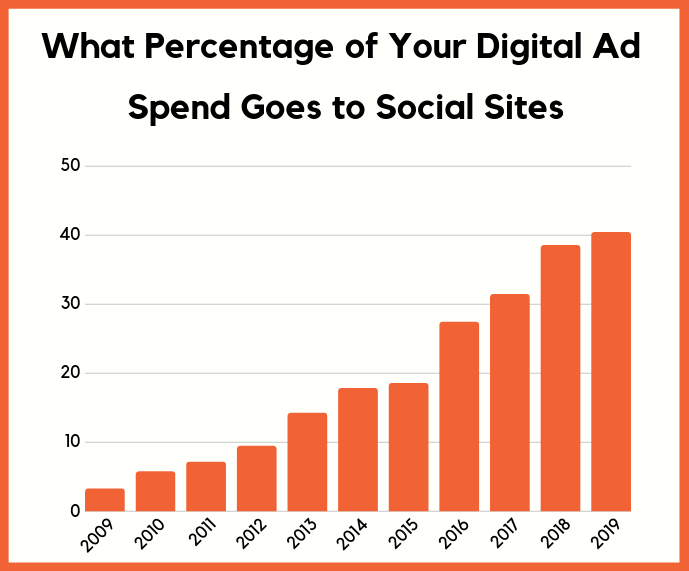
ad spend

Over time it has increased, and you’ll notice that things really started to ramp up in 2016.

An interesting fact is that in the United States during mid-2017, Facebook had more advertisers than inventory. In other words, the demand was higher than the supply which caused CPM and CPC rates to increase.

But similar to the game of cat and mouse SEOs play with Google, marketers also play that game with social networks. In recent years, marketers have figured out how to reverse the trend of their dying organic reach.
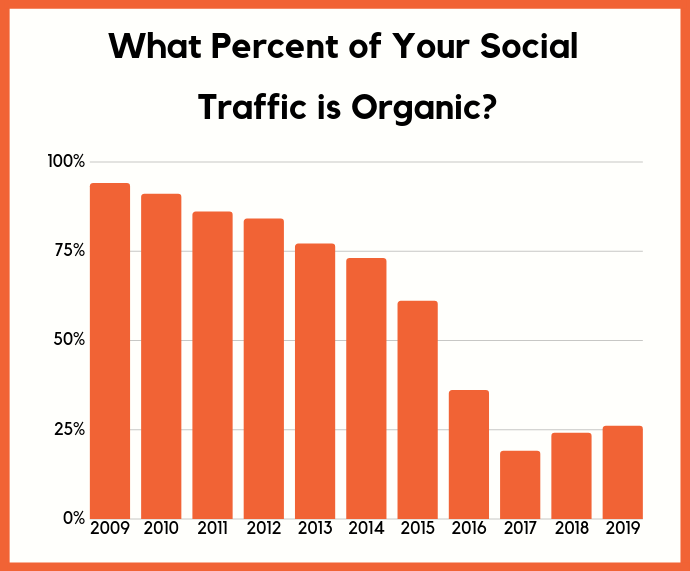
organic social traffic

2017 was a low point, but since then marketers have figured out a way to boost organic social traffic.

It won’t last forever… but can you guess how?

Don’t expect your employees to help

Well, it’s not by asking your employees to share your content.
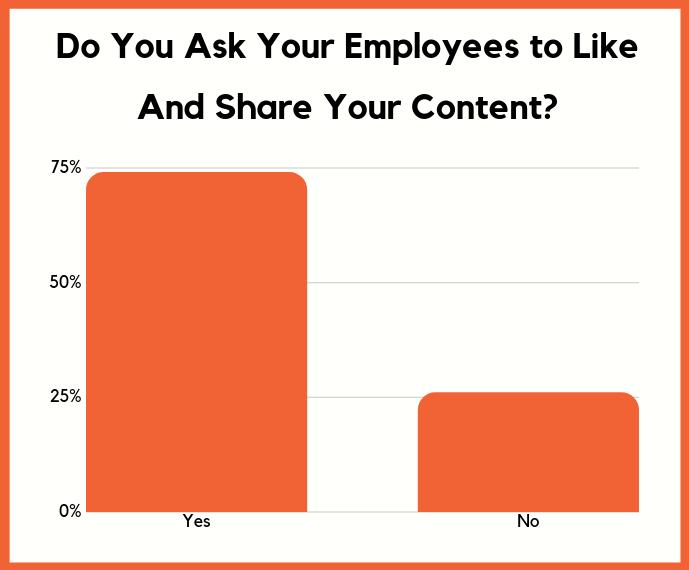
employees content share

Roughly 74% of the companies we surveyed asked their employees to share their content. Might as well get those extra likes and comments, right?

I know I used to do it.
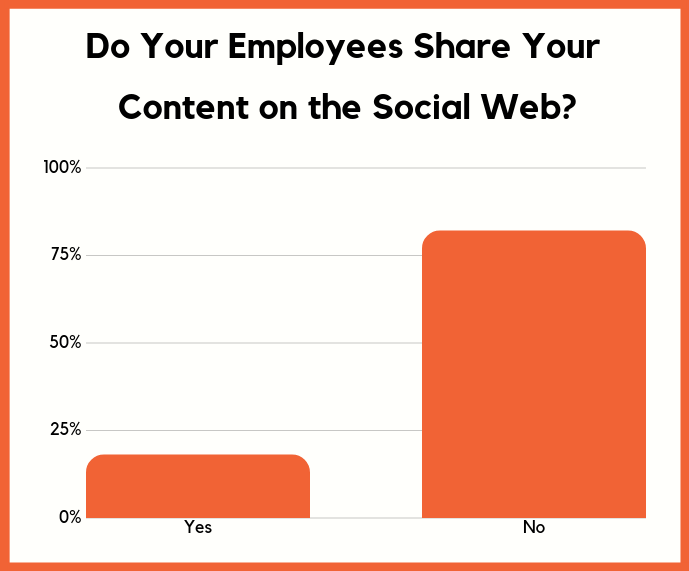
employees don't share

But then I stopped because the majority of my employees didn’t want to share the content. And it’s not just my companies, other companies experienced the same thing.

In other words, the first few times you ask your team members to share, they’ll do it. After a while, they’ll ignore you.

So how are marketers boosting their organic reach?

You have to use chatbots

Here’s how much time companies are spending on each form of social media content.
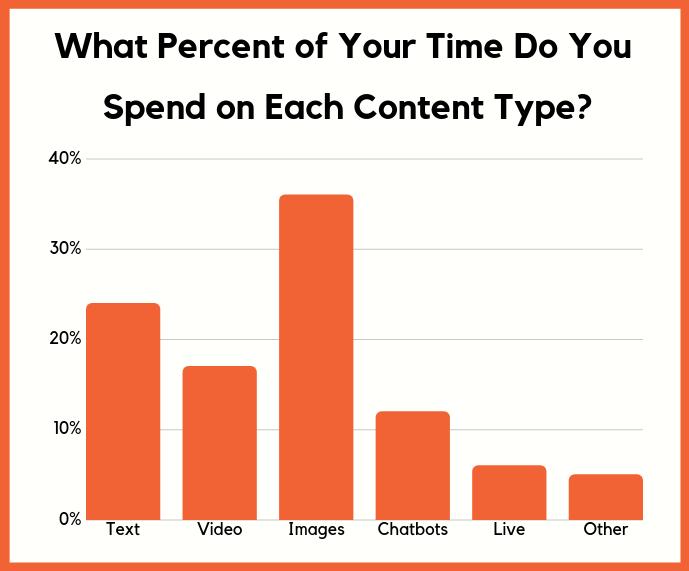
time spent on content

As you can see, everyone loves posting images and text-based updates because they are easy to post.

But they don’t produce the best engagement. It’s actually live video and other forms of video.
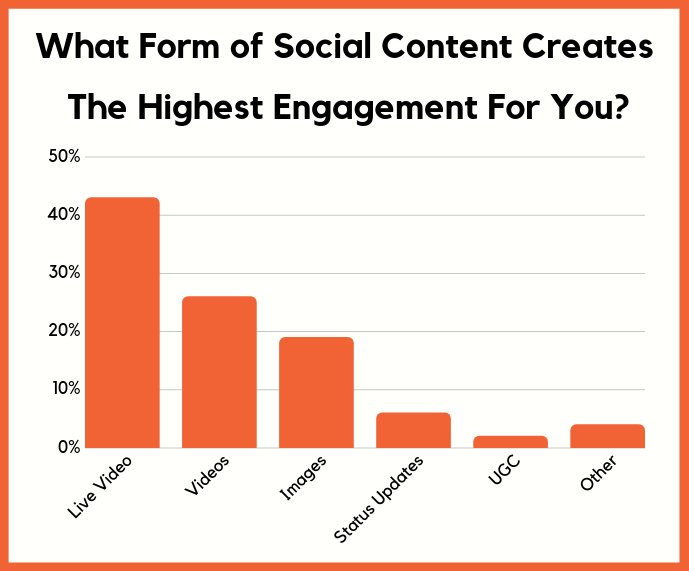
socialcontent

Social platforms are trying to compete with television networks and they are even competing with platforms like Netflix.

So, if you want the most engagement you have to feed into their goals. If you start producing live video or even recorded video, you’ll find that you can boost your engagement. What this will do is get more of your followers engaged so when you post other forms of content they’ll be a higher probability that the content will be seen.

The other reason videos work so well is because they keep people on these social platforms versus driving people back to your site.

But of course, you want your followers to go back to your site… and you can do that through chatbots.
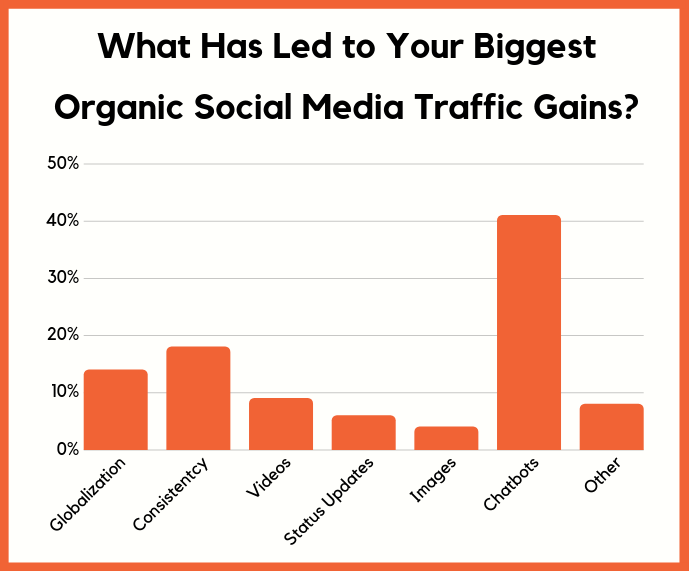
biggest social gains

As you can see, 41% of the companies reported that chatbots (also knowns as messenger bots for social sites) provided their biggest traffic gains.

In other words, if you want to drive people from social sites like Facebook, you’ll have to start using messenger bots like Mobile Monkey.

The chances are you aren’t using messenger bots yet, but they are super effective. Just follow this guide and it will walk you through setting them up.

Now, not every social network has messenger bots, but over time you’ll see this change.

You’ll have to start expanding globally

I’ve been blogging a lot about global expansion from an SEO perspective, but the same goes from a social media perspective as well.
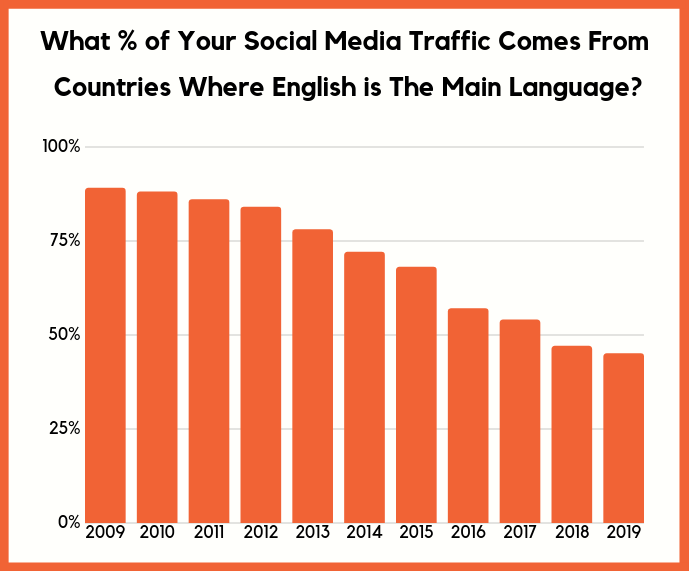
social traffic english

The chart above clearly shows how people are now getting traffic from regions where English wasn’t the native language.

And as companies noticed that trend, they also started posting their social content in multiple languages.
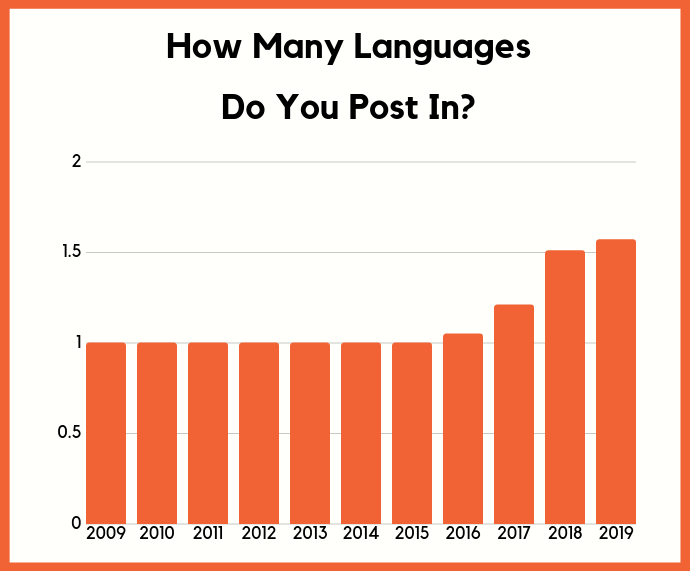
language post in

You’ll see a trend of this continuing over the next few years in which companies will be leveraging globalization as social marketing campaigns in non-English speaking countries in most cases is more profitable.

If you want the most out of your organic social traffic and paid ads you should consider posting content in multiple languages.

Some social networks like Facebook give great targeting options where you can pick which regions you want to show your content in.
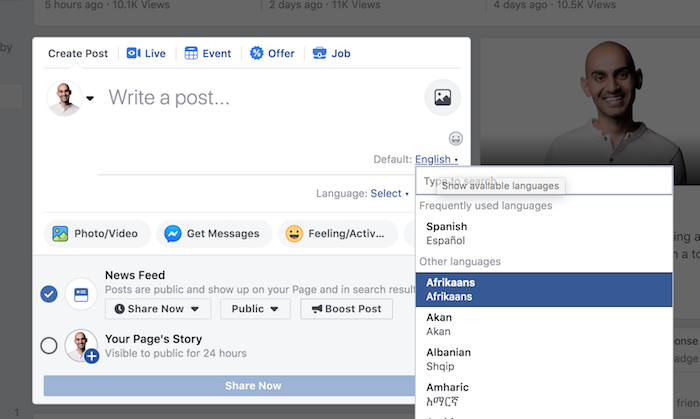
languages

For other platforms like Twitter and Instagram, this doesn’t exist yet.

When you also look at it from an advertising perspective, ads are expensive in regions like the United States, Japan, Canada, United Kingdom, Germany… but they aren’t as costly in most parts of Latin America and Asia.

Now let’s look at social media from a sales perspective.

Here’s how to maximize your social media revenue

Similar to content marketing, don’t expect social media visitors to convert right when they land on your site.

On average, a social media visitor will convert after 3 visits.
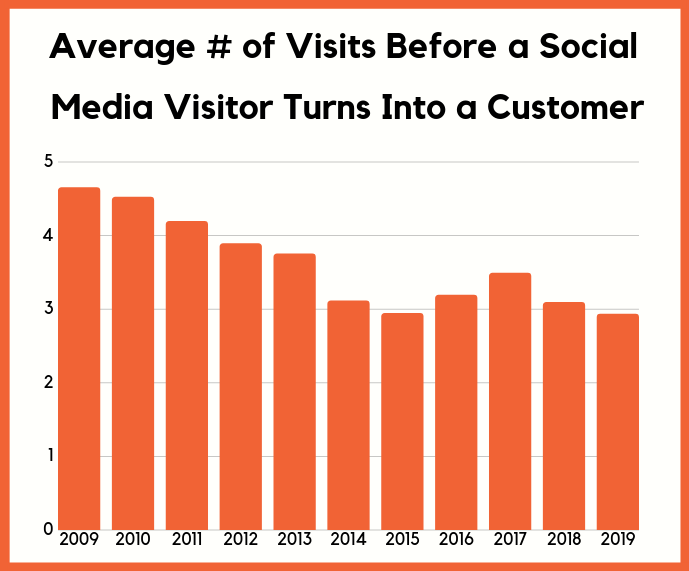
visit before customer

That means you are going to have to focus on getting people to continue to come back to your site if you want more sales.

In other words, you’ll have to play the long game.

The simplest way to do this is to remarket your social visitors. But there are other solutions as well that you aren’t currently using.
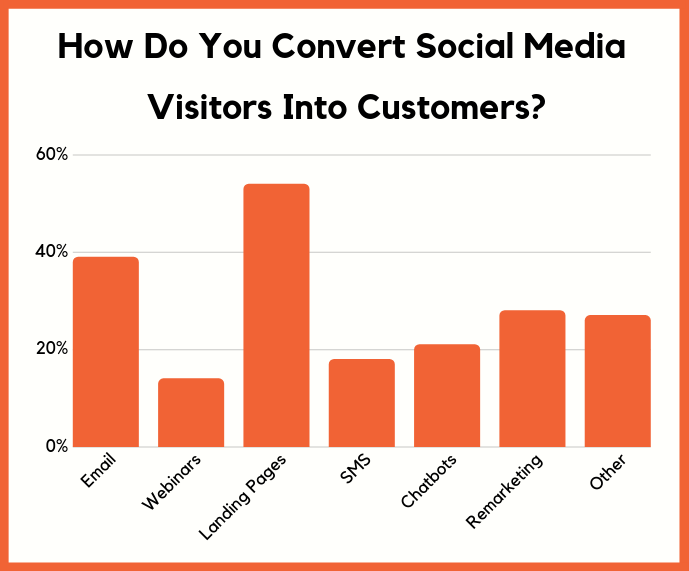
convert social customers

You can use a combination of the methods above. You’ll find that one won’t be enough and you’ll have to combine a handful of methods, including SMS.

You’re probably not using SMS marketing yet, but did you know that when I send SMS messages my response rates are 68%?!

That’s crazy high!

I’m not talking about opens, I am talking about responses!

For email, you can use tools like Hello Bar and for push notifications, you can use tools like Subscribers.

But there are multiple ways to boost your sales from social media, including focusing on specific content types.

Did you know that if you leverage chatbots (messenger bots) and post video-based content you’ll generate more sales on average than if you just posted status updates?
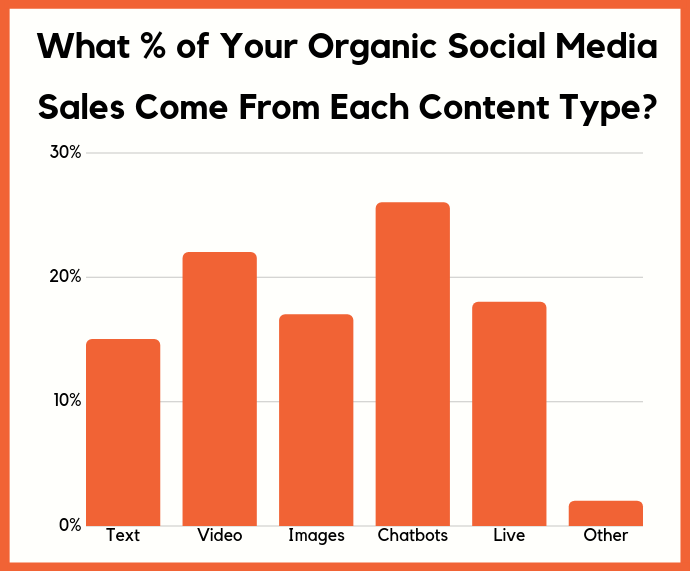
organic sales

I know that sounds counterintuitive as it is easier to drive people to your site using status updates than to create a video, but you have to consider that social algorithms favor video.

You can also optimize your sales by picking specific social networks

Sales is a complicated formula. There’s more to growing your revenue than just focusing on specific types of content social media sites love and optimizing your landing pages.

To get a full picture, you also have to look at the first touch and last touch sales.

First touch sales are the traffic source that people first found you from. They don’t necessarily convert right then and there, but it’s the way they first found you.
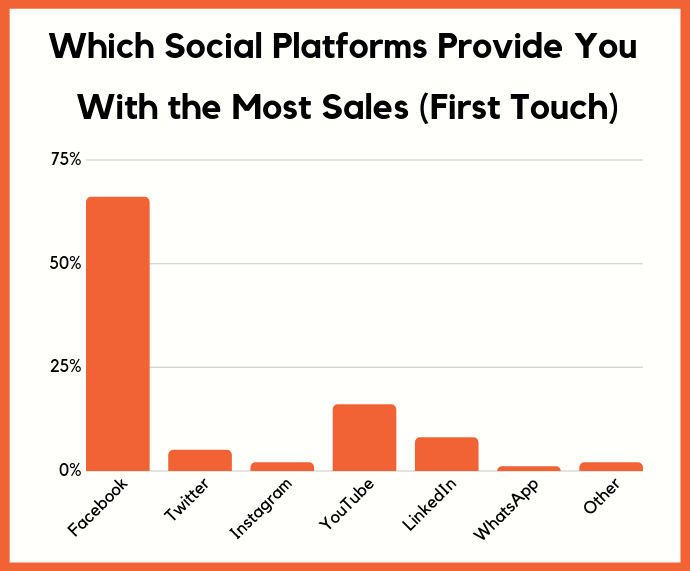
first touch sales

It’s no shocker, but Facebook is the leader when it comes to first touch sales.

Now let’s look at last touch sales, which is where a visitor comes from right before they convert. Remember, someone may have found your site from Facebook, but they may not convert right away.
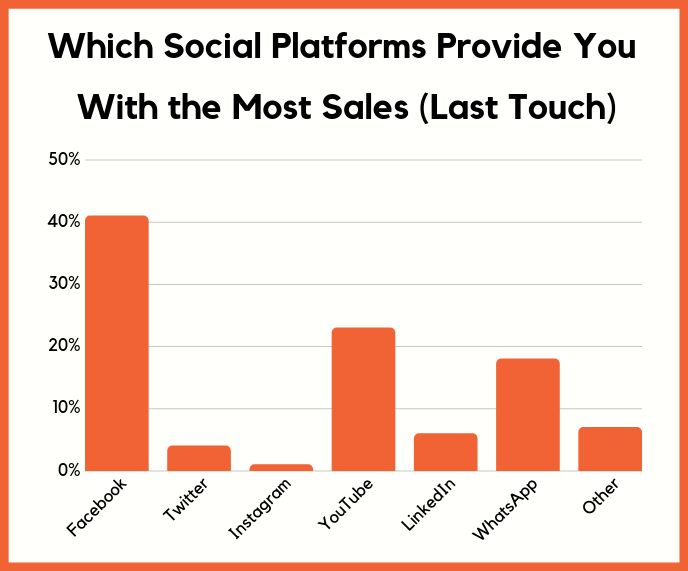
last touch

Sure, Facebook is still the winner, but YouTube is a close second and, shockingly, WhatsApp is in 3rd place.

It makes sense as texting has an extremely high open and click rate. I know you aren’t using WhatsApp for your business yet because that’s what the data shows, but you should check out their business API.
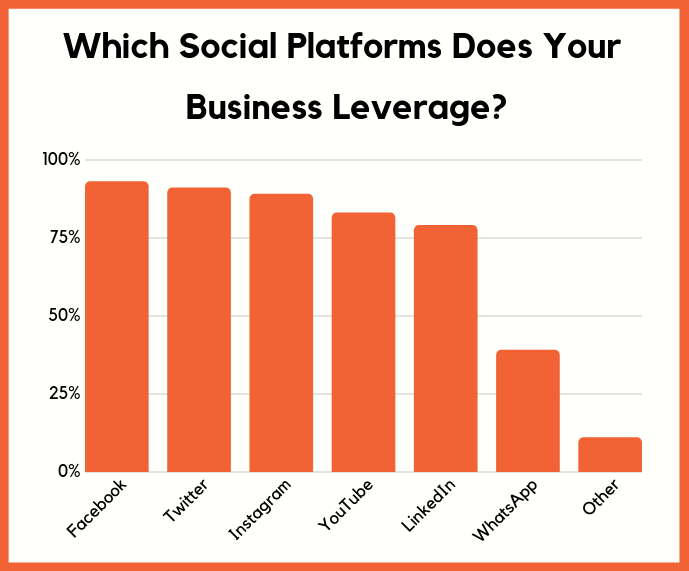
social platform

Conclusion

Over the upcoming years, you can assume social algorithms are going to get tougher from both an organic and paid perspective.

Social media companies are facing heavy governmental pressure due to fake news, privacy concerns, and issues related to political campaigns.

But that doesn’t mean you can ignore the social web or stop using it. It’s not dying and it is here to stay.
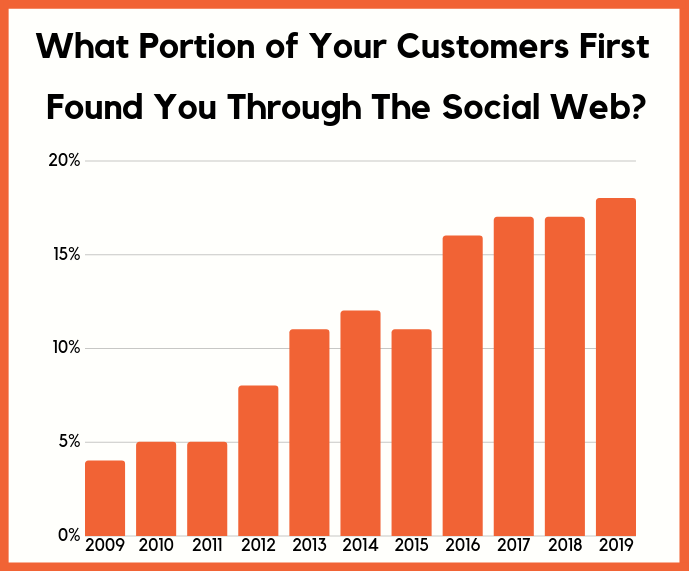
customers find you

The data shows social media is on the rise. Sure, these sites aren’t growing at a rapid pace anymore but that’s due to the majority of the world already being on one of these platforms if not a few of them.

They are effective because people trust what they see on these sites and that should continually increase as they fix issues like fake news.

As long as you follow the tips above, you’ll be able to maximize your social media traffic and revenue even when the algorithms change in ways that don’t favor you.

So how are you maximizing your social media traffic?

PS: If you want to know where content marketing is heading, check this out.

The post 17 Charts That Show Where Social Media is Heading appeared first on Neil Patel.


from Blog – Neil Patel https://ift.tt/2Uccrhd
via IFTTT

What’s Included in a Perfectly Optimized Homepage?

What’s Included in a Perfectly Optimized Homepage? written by John Jantsch read more at Duct Tape Marketing

When you’re trying to get your business noticed online, you need to create a website that stands out. While your site must have a great user experience and make it clear to visitors what your business does, you must also be sure it’s optimized to keep search engines happy.

Building a site with the following attributes will not only make it easy for visitors to understand who you are and to navigate through the rest of your website, it will also make for a strong approach to SEO.

An HTTPS Certified Site

First thing’s first: Both visitors and search engines want to know you site is secure. Google’s Chrome browser has started warning visitors that a site is not secure if it does not have its HTTPS certificate, and they’ve also made it a ranking factor.

Switching to HTTPS is simple, and most web hosting platforms will do it at little or no cost for existing customers. If you don’t switch, you risk falling behind your competition who have made the switch.

Fast Load Time

Another ranking factor is how quickly your site loads. Load time can vary from desktop to mobile devices, and you want your site to be quick on both. If you’re not sure where you stand, check out the PageSpeed Insights tool from Google. The tool gives you a rating—green, yellow, or orange—for your site.

If your site isn’t loading as quickly as you’d hoped, talk to your web developer about strategies to increase the speed. Sometimes it’s as simple as eliminating some of the bigger items and sticking to just simple text and images on your homepage.

Crawlable Content

Search engines like Google go out into the world and crawl websites, looking for information on sites that tell them what the website is about. This is how a search engine determines which queries you should be ranking for.

Let’s say you own a home painting business in the Atlanta area. They’ll likely see terms on your site like “home painting,” “exterior painting,” “contractor,” or “home repair.” They’ll also see your location and contact information. Google then determines, based on what they find, where you should be ranking in a given query. That’s why you’ll turn up in a search for “home painters near Atlanta,” but not “party planner in Seattle.”

Only some website content is easily crawlable, though. Using HTML and simple text on your homepage gives you the greatest shot at getting properly indexed, so that you show up in search results for the most relevant queries.

Include Your Value Proposition

Your value proposition must be clearly highlighted on your homepage. Again, when search engines crawl your website, they’re looking for relevant information about what your business does. Your value proposition not only makes that clear for search engines, it also makes it easy for human visitors to immediately know and understand what your business does.

Featuring your value proposition above the fold, front and center, and in a simple text format, keeps all visitors happy and well-informed.

An H1 Tag and Alt Text for Images and Logos

Another way to get more relevant keywords onto your homepage is to include them in your H1 tag and Alt text on images.

An H1 tag is basically the heading at the top of the page. It’s something that search engines will look to for information on what the website is all about. It will also let visitors know what they can expect to find on the rest of your site. So it’s important that the H1 tag accurately portrays what your business does, and includes keywords in a way that doesn’t make the language seem unnatural.

Alt text can be used to let search engines know about the content of a certain image. They are another way to include additional keywords on your homepage. The Alt text description should really describe what the image is, but you can also use keywords that you’re hoping to rank for.

Let’s say you’re the owner of a local art school in Dallas. There is an image on your homepage of students at pottery wheels, making bowls. The Alt text description could read “pottery students at XYZ Art School Dallas, Texas.” That not only accurately describes the photo, but also includes your business’s name and location.

The Right Metadata

Metadata is the information about your business that is displayed on SERPs. The title is the blue link that you’ll see on Google, and the meta description is the grey type underneath, which gives people a little more context about what they can expect to find if they click on the link.

Make sure that the title and meta description for your homepage are more than just your business’s name. Including something more specific about the products or services you offer, or your location (if relevant). This will help you appear in appropriate searches and also give people a greater sense of what you do.

For example, Duct Tape Marketing’s title is, “Duct Tape Marketing: Small Business Marketing Consulting” and our meta description is, “Simple, effective, and affordable small business marketing system and home of the Duct Tape Marketing Consultant Network.”

Your Contact Information

This may seem obvious, but you’d be shocked by the number of businesses who neglect to include their contact information on their homepage.

Not only is this wildly helpful to visitors who might want to reach out to you with further questions or to make a purchase, it’s also a ranking factor for search engines.

Your contact information should be correct, and should sync up with what search engines will find on your Google My Business profile and other online directories. If there are inconsistencies on your business’s name, location, or contact information, that can hurt how you rank in SERPs (and it can certainly confuse your customers).

You want your homepage to get noticed by customers and prospects who need the solutions your business offers. The best way to do that is to create a homepage that ranks well with search engines and is user-friendly for human visitors. When you optimize your page for both man and machine, you create an effective online base for your business.

If you want to talk more about how to optimize your business’s homepage and website, schedule a consultation with our team.


from Duct Tape Marketing https://ift.tt/2TRlbnZ
via IFTTT

How B2B Marketers Can Strategically Test New Digital Marketing Tactics

How to Strategically Test New B2B Marketing Tactics

How to Strategically Test New B2B Marketing Tactics When it comes to testing new marketing tactics, B2B marketers often find themselves in one of two camps:
  1. Chasing the new, shiny object. (Their motto: Let’s innovate, innovate, innovate!)
  2. Maintaining the status quo. (Their motto: We don’t mess with what’s working.)
Whichever camp you currently find yourself in, chances are high that you’re intrigued by what the other has to offer. The chasers are fearless innovators who are eager to test any new platform, media type, or strategy—and the keepers of the status quo are methodical budget managers who have proven tactics and processes on lockdown. However, we’d suggest finding a middle (camp)ground: Testing strategically. (Your motto: I test to add to my success.) Our rationale is simple: Too much chasing can cause you to lose focus on winning tactics or switch gears without giving a new tactic the proper testing time. And maintaining your commitment “tried-and-true” isn’t wise in the evolving digital landscape; what works today may not work tomorrow. You need to regularly test strategically to keep up with the changing needs and preferences of your target audience. Testing strategically will not only help you accurately measure the effectiveness of new tactics, but also ensure you aren’t blowing your budget (or your reputation) on an unsuccessful test. Regardless to your current approach to testing, start with this six-step framework to give your team a rhythm and process for testing new B2B marketing tactics.  

A Six-Step Framework for Strategically Testing New B2B Marketing Tactics

Step 1: Follow the 80/20 Rule

Dedicate 80% of your marketing budget and resources to tactics you know work based on past performance and historical data and use the other 20% to place a SMART bet on something new. This mix gives you enough budget to give your pilot a chance at success, but ensures you’re got the lion's share of your budget working for you to drive ROI. If you (or your boss) is a keeper of the status quo, this balance should help you both feel comfortable in the fact that you’ll have core tactics working for you. But there’s an important thing to note here: Don’t assume that 20% of the budget will drive 20% of your results. Remember, this is a test, so use it to set a benchmark and set goals around that 80% driving 100% of your results. If you’re not able to do that, then it might make sense to look at a smaller testing budget or a different tactical mix.

Step 2: Document How Your Test Maps to Your Overall Strategy

Like any other tactic, a documented marketing strategy that maps into your overall strategy is key to the success of your pilot. The approach should include the objective(s), target audience, tactics, and KPIs that make sense for your business, industry, and so on. Documenting your approach is a great time to check in and see if this is the right test for your brand. For example, while Instagram for B2B brands is a rising trend, if you’re looking to drive more leads, then it may not be the right tactic to test. If you can, validate whether your target audience is using a new platform or consuming media in a new format. After all, tactics that work really well for some brands may fail for others because their target audience isn’t interacting in that space or in the same way. In terms of goal setting, you may choose to use this test as a benchmark. Or you can elect to set goals based on a similar tactic or test you’ve run previously. Regardless of which road you take, document the decision as part of your approach. This will help set appropriate expectations with your team and help you better determine whether a tactic was successful. [bctt tweet="If you’re testing a new marketing tactic, document everything. This will set expectations and help you measure success. @Alexis5484" username="toprank"]

Step 3: Research and Consult with an Expert

If you are testing a new tactic, in order to really understand the effectiveness, it’s important to have the best execution possible. For example, if you’re trying a new advertising platform, advice and case studies from experts can help guide your approach to setting up targeting, media types, messaging, and so on. If you’re making a larger investment, consider partnering with an experienced agency or consultant. Agencies and consultants are typically the first to test new media types and tactics. For example, influencer marketing is rising in adoption in the B2B, but few brands have the bandwidth or the experience to build a successful campaign from scratch. However, an experienced B2B influencer marketing agency will have the expertise and connections can help you nail your pilot. In addition, if you tested a tactic one or two years ago and determined it to be ineffective, do some research and consider testing again. Whether your target audience is slower to adopt new formats or refinements have taken place, you may be missing out on a new opportunity if you’re not open to all possibilities. Read: 5 Key Trends in B2B Influencer Marketing Plus Critical Do’s and Don’ts

Step 4: Create a Plan of Attack

Right after you’ve documented your strategy, create a plan that includes the steps, timeline, communication channels, resources and milestones for launch, optimization, and measurement. It’s easy to miss steps when you’re testing something new. If the test is complex, get the team together to brainstorm process based on their expertise. However, as detailed as your plan is, you’ll probably miss something. So, build in some flexibility in your timeline and a solid communication platform to ensure your team can adapt to the unexpected.

Step 5: Give Yourself Time to Optimize

Despite all your planning and research, there will almost certainly be opportunities to optimize and improve the performance of your pilot. If you’ve ever launched a new blog, podcast, or social channel, you know it can take a while for performance to build. For any new destination, we’d recommend at least four to six months of testing.  During this time frame, you’re looking to:
  • Test within your test. Piloting video? Try different topics, formats (e.g. talking head, motion graphics, or live interviews), destinations, and promotional tactics.
  • Identify high-flyers. As you’re monitoring results, identify which variations and combinations work the best and do more of that.
  • Look for a steady improvement in performance. Typically, we recommend pulling the plug on a test if after two or three rounds of optimization if you see little or no improvement in performance.
Measuring and optimizing over time, will give you the most accurate measure of effectiveness of a test, and ensure you’re not passing on a potentially impactful tactic.

Step 6: Schedule a Retrospective

Retrospectives can be a really impactful tool when it comes to evaluating the effectiveness of a test. At the start of your test, schedule a retrospective based on your planned timing for wrap. Invite all key stakeholders who worked on or were impacted by the results of the test. Plan to discuss:
  • Results: How did the results compare to goals or benchmarks? What variations worked best? What didn’t work?
  • Process: How was the workflow for planning, execution, reporting and optimization? What improvements can be made for this specific workflow?
  • Next Steps: Do you plan to continue this tactic? Try another test with new variations? Expand to another business line or team?
The retrospective can be an easy step to miss, especially if you’re already on to the next shiny object. It can be easy just to expand or close a test without much discussion. But it's an important step to share information with your entire team and apply learnings to your next test. It can also be an opportunity to iterate on your testing process. [bctt tweet="Retrospectives can be a really impactful tool when it comes to evaluating the effectiveness of a #marketing test. @Alexis5484" username="toprank"]

Ready to Start Testing New Marketing Tactics?

We all know it’s important to keep evolving our digital mix, in order to continue to reach and nurture our prospects. Creating a framework for how you approach and execute on test will ensure you are able to truly measure the effectiveness of every test. Don’t have the personal bandwidth, budget, or internal resources to test something new? Working with an agency that can adapt to your changing needs could be the ticket.

The post How B2B Marketers Can Strategically Test New Digital Marketing Tactics appeared first on Online Marketing Blog - TopRank®.


from Online Marketing Blog – TopRank® https://ift.tt/2UwYObX
via IFTTT

Voice-Assistants Reading Emails: How Marketers Can Adapt

The launch of the Apple iPhone in 2007 prompted a decade-long effort for marketers to make their emails mobile-friendly. The rise of voice-assistants will likely have a similar impact on email marketers, although less tectonic and probably much messier.

Let’s look at why, and what marketers should do about it…

The Rise of Voice-Assistants Reading Emails

What’s undeniable is that the adoption of smart speakers and voice assistants is growing rapidly. More than 86 million smart speakers were sold last year, with more of them sold in the fourth quarter than during all of 2017, according to StrategyAnalytics. And nearly 8 billion digital voice-assistants—embedded in smartphones, speakers, cars, and elsewhere—will be in use by 2023, according to Juniper Research.

What’s a lot less clear is how many consumers will use voice-assistants to interact with emails. Since reading an email via voice doesn’t activate its open tracking pixel, data on voice interactions is anecdotal or survey-based at best. For the time, it’s safe to assume that very few commercial emails are engaged with using voice-assistants.

The Limitations of Voice-Assistants

Voice-assistants remind us of Apple Watches and the early Blackberry devices. None of those platforms support web browsers, so it’s impossible to click through to the landing page of a commercial email.

Voice-assistants do allow for replies, which make it possible to engage with personal emails and many work emails. However, email marketers have unfortunately spent decades training people not to reply to their emails. Plus, adapting existing calls-to-action to be reply-friendly would likely be impossible for the vast majority of brands. So, for now, emails are a dead-end for all but verbal and offline calls-to-action, such as “shop our in-store sale tomorrow” or “call us at 1-800-555-5555.”

Until there are better online conversion options via voice, consumers aren’t likely to use voice-assistants to engage with emails from brands. Instead, they’ll use them to triage their inbox, just like many people do with their smartwatches. They’ll simply use it to delete messages they aren’t interested in and keep the ones they are interested in, which they’ll then truly read later on a smartphone, tablet, or computer.

How Email Marketers Should Adapt to Voice-Assistants

Since consumers can’t convert, the goal for brands is to have their emails be among those that their subscribers save to interact with later.

1. Have clear sender names, subject lines, and preview text.

Optimizing your envelop content is a best practice. Using a consistent and highly recognizable sender name helps build trust and brand engagement, using descriptive subject lines that are supported by preview text helps ensure that the right subscribers are opening each message.

But voice-assistants raise the stakes on recognition in the inbox. For instance, after reading the sender name and subject line, Alexa asks if you want to hear the full email. Siri reads the sender name and subject line, and then begins to read the email, which make a strong and descriptive preheader essential.

“In my testing with Siri, it was unable to provide me with enough info to triage my accounts like I would on my phone or desktop,” says Henry Alva, Senior Email and Web Developer for Oracle Marketing Cloud Consulting’s Creative Service group. “Often this was because of unclear friendly from names, and subject lines and preheader text that wasn’t descriptive enough.”

2. Be mindful about your choice to use emojis, special characters, and elaborate punctuation or spacing.

Voice-assistants stumble when it comes to creative text styling, as well as the use of emojis and special characters.

“There’s a lot of misuse of punctuation and grammar in subject lines,” says Kristin McCambridge, Senior UX Designer at Oracle Marketing Cloud Consulting. “Even quotes and parentheses can be problematic. Air quotes are tricky because they lose some of their pithiness when voice-assistants say, ‘quotation mark’ on either side of the word or phrase. With voice-assistants, you have to be careful that it’s not coming across in a way that you don’t intend.”

Strikethroughs are awkward like air quotes, turning something that’s supposed to be light and funny into something clunky and heavy-handed. Onomatopoeia and creatively spelled words are likely to trip up voice-assistants, as are special characters and emojis.

For example, Siri reads the following subject line as “Bee are are are are are are. Warm up with bonus miles.” That’s confusing and distracts from the rest of the message that follows.

Emojis can be even more jarring, since many emojis have names that don’t roll off the tongue very well. For example, Siri reads the following subject line as “The Walking Dead Returns on Sunday, Zombie Man." The subject line almost sounds as though Sling TV is addressing the subscriber as “Zombie Man.”

Combine emojis with creative word styling and you can get some truly confusing subject lines. For instance, Siri reads this subject line as “Sparkle sea ell ee ay en eye en gee sparkle ess ay ell ee sparkle.”

“Voice-assistants—as well as screen readers—don’t have the ability to make content translations yet, so acronyms, emojis, and other creative text treatments and wordplay run the risk of being misinterpreted by a reader,” says Kathryn Alva, Associate Creative Director at Oracle Marketing Cloud Consulting. “While these tactics can help your subject lines stand out in the visual inbox, unfortunately, they fall flat in the verbal inbox.”

And that is the choice that we face:

Should brands create eye-catching subject lines or ear-catching subject lines? [Tweet This]

Right now, it’s impossible to do both. So, it’s important to be mindful about the subject line decisions that you’re making—not just to potentially take advantage of voice-assistants, but also in terms of creating inclusive email designs that allow more of your subscribers to engage.

3. Use email accessibility best practices to be more inclusive.

Your subscribers may have permanent, temporary, or situational impairments that affect how they engage with your emails.

“Are they using a voice-assistant because they’re in a car, because they’re blind, or because they’re in the sun and can’t read their smartphone’s screen?” says McCambridge. “Designing with all of those people in mind is really important.”

Inclusive design is about using accessibility best practices to widen your audience of subscribers that can engage with your design. While there is a full-range of accessibility best practices, let’s focus on the two that have the biggest impact on how well voice-assistants can read your emails.

First, use semantic HTML tags. Unlike tags like <b> and <i> that define how your text should look, semantic tags define what kind of text it is. For example, <p> indicates that the text is part of a paragraph, and <h> tags (<h1> through <h6>) indicate that the text is a header.   

And second, use alt text wisely and descriptively. Not every image needs alt text. For instance, you should consider not adding alt text to lifestyle images such as photos of sunsets or people working that aren’t pivotal to understanding the message of your email. You should also consider not adding alt text to product images when that alt text would simply repeat HTML text that’s next to the image.

“You’ll want to ensure that the alt text adds value to the content and is not repetitive of text that also appears within the email,” says Kathryn Alva. “It’s surprising how often we see this.”

That said, logos and other images that contain graphical text should absolutely have alt text so you can communicate the text in the image.

4. Pay attention to the order of content blocks.

Sometimes the visual logic of a design doesn’t match up with the sequential reading that a voice-assistant or screen reader will do. This will increasingly cause confusion.

“A screen reader will simply move cell by cell through the email's tables, reading text and image alt text in coded order,” says Kathryn Alva. “What this means is that tables should be coded in logical order so that content is read correctly.”

In the example below, the "Exclusive Offers + More" table is coded in rows, even though the content is grouped together in columns. This causes the voice reader to address all the images, then all the text, and then all the links.

“The result is a disconnected experience,” she says. “Simply re-coding this content in organized columns solves the content-relationship issue.”

Those are our top four tips for adapting to voice-assistants for now, but it’s important to recognize that over time these platforms are likely to evolve—perhaps quite quickly.

For instance, given how clumsy reading emails can be for machines, I predict in my book, Email Marketing Rules, that inbox providers may add a new MIME part to directly address this: a voice-html part. Similar to how responsive design addresses mobile readers, this would allow marketers to craft succinct and clear messages that are intended to be read aloud.

Whether inbox providers adopt that approach or make other changes to make voice more natural, voice-assistants will continue to learn and rapidly advance, says Henry Alva.

“In terms of a new form of email client and in terms of accessibility, they are not something we should ignore,” he says. “This is a space that marketers should watch carefully.”


Need help with your email creative? Oracle Marketing Cloud Consulting has more than 500 of the leading marketing minds ready to help you to achieve more with the leading marketing cloud, including a Creative Services team that can handle any aspect of email design, coding, testing, and copywriting.

Learn more →


from Oracle Blogs | Oracle Marketing Cloud https://ift.tt/2FJjljV
via IFTTT

Monday, 1 April 2019

Hey Alexa: How Do I Bake Voice Search Into My B2B Marketing Strategy?

Voice Search & B2B Marketing Strategy

Voice Search & B2B Marketing Strategy Can you imagine if we actually talked to one another the same way we’ve historically talked to search engines? It would make for some awkward interactions. "Minneapolis movie showtimes." "Um... come again?""Showtimes Captain Marvel 55441." "Are you –" "Movie showtimes cheapest theater arcade games. I'm feeling lucky." "Sir, this is a Wendy's." It’s only fitting I suppose that our adherence to Google’s robotic algorithms has, in turn, made us more robotic. Searchers became trained to speak in the engine’s keyword-driven language. Marketers crafted SEO strategies accordingly. Today, the advent of voice search is making our conversations with search engines more… conversational. It’s not incidental that we activate this feature on our smartphones or voice assistants by addressing “Alexa” or “Siri” — this dynamic is very much intended to humanize the devices, which is a little creepy and dystopian if you think about it, but it’s best not to think about it. In any event, this movement toward more conversational search aligns with a general focus on humanizing B2B brands. So let’s take a look at how marketers can adapt and thrive in the age of voice search.

Voice Search and B2B Marketing Strategy

In January, TopRank Marketing’s Associate Director of Search and Analytics Tiffani Allen outlined SEO predictions and trends for 2019, and voice search was of course one of the pillars.   “In 2019 and beyond it will be increasingly important for marketers to optimize and create content that lends itself to voice search,” she wrote, pointing out that — according to Gartner projections — 30% of web browsing sessions will be done without a screen by next year. “From a technical perspective, the usual suspects of page speed, site security, and domain authority will play an important role here. But at the end of the day, it’s all about ensuring your site content can be easily found via voice search.” So, beyond those mainstay technical aspects, how can we ensure our content is discoverable for the right people? Fundamentally, the solution lies in best answer content. We recently discussed the ways in which a best answer SEO strategy lines up with voice search, because it compels us to understand the mindsets of searchers and speak their language. That post features a number of suggested methods for learning about the questions your customers are asking. Once you’ve completed this groundwork, it’s all about creating content that comprehensively answers those queries. Beyond this overarching guideline, here a few specific items for B2B marketers to keep in mind when assessing their go-forward approach to voice search.

Think Mobile

The majority of voice searches come from mobile devices, increasing the emphasis on what should already be a central consideration. Research shows that some 50% of B2B queries come from smartphones, and Boston Consulting Group expects that figure to reach 70% by 2020. Responsive design and lightning-quick load times will be the big difference-makers here. If you haven’t lately, we recommend working with an agency or your internal SEO and analytics team to conduct a full mobile audit for your website and any other key digital real estate.

Think Local

A significant portion of voice searches carry some level of location-based intent. This is often at odds with digitally oriented B2B brands, which tend to be less reliant on attracting physical customers and thus less likely to prioritize local search. But if you want to be visible (er — audible) in voice search results, it’s worth exploring ways you can invest in local content.

Think Vocal

This brings us back to the “best answer” imperative we mentioned earlier. When conceiving and creating content, do so with a literal question-and-answer format in mind, based on the research you’ve done to understand your audience’s top curiosities. And I mean really answering the questions, not just fulfilling the search query. Nearly every piece of content we generate should tie back to some particular question that might follow a “Hey Alexa…” Google has been prioritizing semantic search ever since the Hummingbird update, so this is a consideration that extends beyond voice.

B2B Marketers: Find Your Voice

Even though one recent study suggests that the seemingly unstoppable momentum of voice search is slowing just a tad, there’s no question that it has become a sizable factor in customer journeys and will remain one going forward. The good news is that optimizing your B2B content strategy for voice search doesn’t need to be a separate and distinct focus. Most of the practices that are conducive to voice search traction are just plain generally advisable for B2B brands:
  • Answer your audience’s most burning questions in conversational terms.
  • Summarize the core substance of your content early on for traction in featured snippets.
  • Deliver a seamless mobile experience at every step.
  • Tap into the hidden B2B opportunity that is local search.
The bottom line is that B2B companies need to be less robotic, and more human. The rise of voice search is simply another trend feeding the urgency. For a deeper dive into the combination of best answer content and search, read: How B2B Marketers Win at Search with Best Answer Content.

The post Hey Alexa: How Do I Bake Voice Search Into My B2B Marketing Strategy? appeared first on Online Marketing Blog - TopRank®.


from Online Marketing Blog – TopRank® https://ift.tt/2uEQgky
via IFTTT

Leveraging Loyalty Data to Optimize Personalization

It’s no secret in the marketing world that the goal of a loyalty program is two-fold: to improve customer acquisition and retention while collecting customer data. The idea was that the latter would contribute to the former by allowing a business to gain a better understanding of their best customers’ buying habits and preferences in order to keep them and attract more like them. That has been accomplished primarily by marketing to a set of personas based on patterns identified in the data collected.

Those generalized personas were a boon for businesses when loyalty programs were in their infancy, but in today’s data-rich age, an evolved loyalty program will put that data to work in order to hyper-personalize individual customer experiences. And that’s what customers have come to expect. Recent research found that 91% of consumers are more likely to shop with brands who recognize and remember them well enough to provide relevant offers and recommendations. If your business has a loyalty program, you have the data that will allow you to provide exactly that, to the nth degree.

The first step is to integrate loyalty data with all the other customer data you collect, from all sources. This includes purchase history (both online and in-store), app usage, browsing behavior, and social interactions. Once you have all that data in one place, you can optimize personalized content based on that data across all touchpoints.

Here are just a few examples:

Connect Loyalty Data and Purchase History

Loyalty programs have traditionally been based primarily on spend amounts, i.e. spend $1.00 to earn 10 loyalty points. But how much a customer spends fails to take into account what they’re spending their money on. Imagine a long-term Designer Shoe Warehouse loyalty member who is repeatedly presented with loyalty deals on high heeled pumps and dress boots, despite the fact that data shows years worth of past purchases for casual flats exclusively. That’s a bad customer experience. But it’s one that can easily be improved simply by connecting what the user buys with the rest of their loyalty data.

Connected data will allow you to tailor loyalty offers to each individual customer’s purchase patterns — no matter how loyal a customer might be, there’s simply no point in offering them a deal on something they’ll never buy. When you customize your loyalty offers based on purchase history, your customers are far more likely to both appreciate and take advantage of them, solidifying their loyalty and positively impacting your bottom line.

Surface Loyalty Status Online and In-App

If you connect your loyalty program to your app (if you have one) and/or your website, and encourage your customers to browse while signed in, you will be able to present loyalty offers while the customer is shopping. A customer browsing a particular product line will be more likely to purchase if they are aware of things like, “Purchase this item to receive xxx bonus rewards points,” or, “Your Gold status entitles you to receive xx% off at checkout.”

Connecting your loyalty program with your website/app experience will also allow you to surface program benefits available to a user while they’re actively making a purchase decision. For example, a customer shopping for airline tickets would appreciate being reminded that, “Your gold status allows one checked bag per passenger at no extra charge.” Or a traveler booking a hotel room might book an extra night if you remind them that, “You’re just xx points away from Premier Loyalty status. Book three nights to qualify for a free upgrade and complimentary WiFi.”

Tying it All Together in Emails

The perfect place to tie all that data together is in your emails. Promote your loyalty program in your marketing emails but if you already know the customer’s loyalty status — and ideally, you should — then use that real estate for personalized offers based on loyalty status, purchase history, or both.

Beyond marketing emails, you should also be encouraging loyalty program sign-ups in your transactional emails. Avoid annoying people who are already loyalty members by making that sign-up offer dynamic, to display an alternate offer to existing members.

Once your loyalty program data is sufficiently integrated, you’ll also be able to go a step further to personalize the content and offers presented in digital receipts and shipping confirmations based on both the customer’s purchase history and their loyalty status.

For example, if a customer buys an item online, a typical receipt email might include a selection of related products, such as ‘You might also like…’  But those recommendations are usually based on the product, not on the customer, which means the list can potentially include items already purchased. And let’s face it, no one likes being offered something that’s already hanging in their closet.

But if you have your user’s purchase history and their loyalty status combined, imagine how specifically personal those offers can be?

  • “You already have [product A] and [product B] - buy [product C, D, or E] for 50% off by redeeming xx rewards points.”
  • “Exclusive to Platinum Loyalty Members! Buy [accessory A, B, or C] for [previously purchased product] and get [accessory D] free!”

Transactional emails are also the perfect place to surface loyalty status and upcoming rewards. For example, “You earned XXX points on this purchase. You’re just XX points away from Super Loyal status!.”

You might be thinking you already do this in your loyalty program emails. But loyalty emails are almost never personalized based on purchase history, just as transactional and marketing emails are rarely personalized based on loyalty status. Personalizing both types of emails, based on both sources of data, can put you that much closer to true, one-to-one personalization.

See how more personalization and better use of data can make all the difference with “Accelerate Your Marketing Efforts.”

Read the report


from Oracle Blogs | Oracle Marketing Cloud https://ift.tt/2UnrfZC
via IFTTT

Saturday, 30 March 2019

Weekend Favs March 30

Weekend Favs March 30 written by John Jantsch read more at Duct Tape Marketing

My weekend blog post routine includes posting links to a handful of tools or great content I ran across during the week.

I don’t go into depth about the finds, but encourage you to check them out if they sound interesting. The photo in the post is a favorite for the week from an online source or one that I took out there on the road.

  • Square Invoices – Send invoices and estimates quickly through this app.
  • Outgrow Chatbots – Always be available for your customers online with a customized chatbot.
  • ManyPixels – Discover royalty-free illustrations for your design projects.

These are my weekend favs, I would love to hear about some of yours – Tweet me @ducttape


from Duct Tape Marketing https://ift.tt/2uDdQhI
via IFTTT