Wednesday, 2 September 2020

Best Accounting Software

Disclosure: This content is reader-supported, which means if you click on some of our links that we may earn a commission.

82% of businesses fail because of poor cash flow management and subpar accounting practices. Yikes. It’s no secret that accounting is hard — and there’s a reason people spend their entire lives learning how to do it well. 

But there’s good news. 

You can avoid becoming a part of this statistic without heading to university to get a Bachelor’s (or Master’s) degree in accounting.

Enter… modern-day accounting software. It exists to help even the smallest businesses improve their bookkeeping processes, save time, and make fewer costly mistakes. 

Plus, understanding your numbers can lead to smarter business decisions and improved overall business health/performance as well.

However, choosing the best accounting software isn’t easy, thanks to the thousands of options on the market. Which one offers everything you need without a slew of confusing features you’ll never use? 

If you’re not sure how to answer that question, you’re in the right place. This article covers how to choose the right software, the different types of software, and my top five recommendations. 

Let’s get started!

The top 5 options for accounting software: 

  1. FreshBooks – Best for freelancers and solopreneurs
  2. QuickBooks – Best accounting software for small businesses
  3. Zoho Books – Best for businesses with 50+ customers/vendors
  4. Sage50 Cloud – Best desktop accounting solution
  5. Wave – Best free accounting software

How to choose the best accounting software for you 

There isn’t a one-size-fits-all accounting solution for every business in every industry. Furthermore, the size and complexity of your business play a role as well. 

Because of this, it’s critical to understand your budget and software requirements before making any decisions. To help you out, these are the criteria I considered when creating this list. 

Feel free to use them as you go through the process of making your final choice. 

Number of clients, vendors, and users

It’s important to consider the number of clients and vendors you manage because certain plans limit the number you’re allowed to have. So be sure to pay close attention to the limitations of each plan before making your final decision. 

Furthermore, you need to know how many user accounts you need as well. Some of the basic plans included in this list limit the number of users to one or two. 

So, you may need to upgrade to an advanced plan to accommodate your needs if you need more than that. 

Mobile accessibility

Make sure the software you choose offers a mobile app so you can manage payments, invoices, and cash flow on the go. It may not seem like an important feature now, but you never know when (and where) you need to access your accounts or send an invoice.

Client management

The best accounting software includes intuitive features that let you follow up on invoices and a portal where your clients can pay you. With internal client management tools, revenue and accounting are centralized in one location to simplify the process. 

Plus, it’s easier on your clients. 

Billing and invoicing

Most accounting software includes invoicing functionality but in different capacities. Some offer highly customizable invoices while others are easier to use with fewer customization options. 

Furthermore, the software you choose should make paying invoices as easy as possible for your clients. Some other billing and invoicing features to consider include:

  • Automatic payment reminders
  • Payment due dates
  • Late fees
  • Recurring invoices
  • Ability to save client information
  • Payment processing options
  • One-click payments

Lastly, consider the payment processing fees associated with each software. Most charge a set percentage plus a small fee for credit card transactions and 1% for ACH transfers. 

Receipt management

Many modern accounting tools make it easy to categorize and store digital versions of your receipts. All you have to do is snap a photo of your receipt and attach it to the associated expense in your account. 

However, not every software includes this. So, if this is something you’re interested in, be sure to choose an accounting software with receipt management capabilities. 

Banking

Connecting your bank accounts and credit cards to your accounting software makes account reconciliation a breeze. It also reduces the chances of human errors when making manual entries. 

However, not every software offers this capability on basic plans (but all of my top recommendations do). 

So make sure you opt for a software that includes this functionality.  

Integrations

It’s important to consider the tools you’re already using to run your business. Why? Because the best accounting software for you integrates seamlessly into your tech stack with minimal hassle or headache. 

So before you get started, make a list of everything you need and the tools you already use. 

Then, make sure the top contenders on your list include your full requirements and the necessary integrations. 

You can even schedule a call with a sales rep for each accounting software to walk through your list of requirements to make sure they can handle everything you’re looking for. 

The different types of accounting software

When it comes to accounting software, you have several options. Some of them are better than others, but the best choice for you depends on your situation. 

So let’s walk through your options before we dive into my top recommendations. 

DIY spreadsheets

Spreadsheets are a free, DIY option if you’re on a tight budget. They work okay if you’re just getting started and have a limited number of business transactions. 

However, they’re not a long term solution and they leave a lot of room for human error. 

If you’re looking for a free option, I highly recommend Wave as an alternative. 

Cloud-based accounting software

Most modern-day accounting software is cloud-based, making it easily accessible from anywhere with an internet connection. 

And it’s usually billed on a monthly basis, scalable, affordable, easy to use, and built for small to midsize businesses. 

Every option on this list falls under this category. 

Database accounting software

This is a type of highly secure accounting software specific to enterprises and large businesses. 

It’s very expensive and requires an in-house team of engineers and/or financial specialists to install and maintain. 

Because of that, I didn’t include this type of software in my research. 

Now, let’s dive into my top accounting software recommendations based on the size of your business and your specific needs. 

#1 – FreshBooks Review — The best for freelancers and solopreneurs

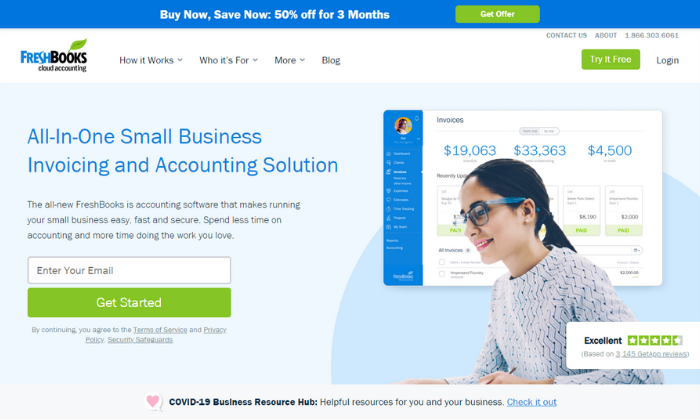
If you’re a freelancer, solopreneur, or small business, FreshBooks is a great accounting software to consider. To date, they serve more than 10 million businesses around the world. 

And the software complies with double-entry accounting standards, providing you with more in-depth insight into your finances and business transactions. 

FreshBooks specializes in invoicing, but the tool also includes small business features, like:

  • Time and expense tracking
  • Recurring invoices
  • Automatic payment reminders
  • Automatic late fees
  • Multiple currencies
  • Project management
  • Client proposals
  • Tax calculations
  • Reporting and analytics

Furthermore, your account dashboard includes a birds-eye view of your business’s financial health. It shows outstanding invoices, total profit, revenue by source, expenses, and unbilled time all in one centralized location. 

Plus, you can manage your books on the go using their robust mobile app. 

And the software integrates with over 200+ business tools like Shopify, G Suite, Stripe, Zoom, Squarespace, and Gusto. So, you don’t have to worry about incompatibility with most of the tools you already use. 

But like most accounting software, FreshBooks charges a transaction fee of 2.9% + $0.30 per transaction for credit cards and 1% for ACH transfers. However, these fees are pretty standard across the industry, and you don’t have to worry about any additional hidden costs. 

Their paid plans start at $6 per month for up to five clients making it very affordable for freelancers, solopreneurs, and small business owners alike. 
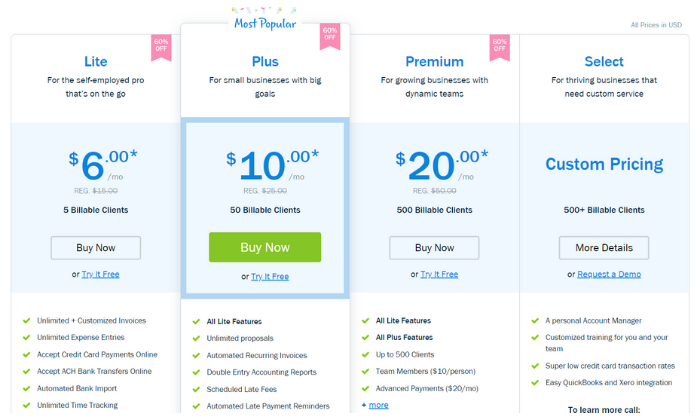
However, FreshBooks can scale alongside your business with other plans, including:

  1. Plus — $10 per month for up to 50 clients
  2. Premium — $20 per month for up to 500 clients
  3. Select — custom pricing for more than 500 clients

Sign up for a free trial to take FreshBooks for a test drive today! Alternatively, you can save 50% off your first three months. However, you have to choose one offer or the other. 

#2 – QuickBooks Review — The best accounting software for small businesses

If you’re running a small business or starting a new business from scratch, QuickBooks is a popular choice — and for a good reason. In fact, over 5.6 million users around the world trust them for their accounting needs. 

From small businesses to self-employed individuals, QuickBooks offers an array of excellent accounting solutions to match your needs. 
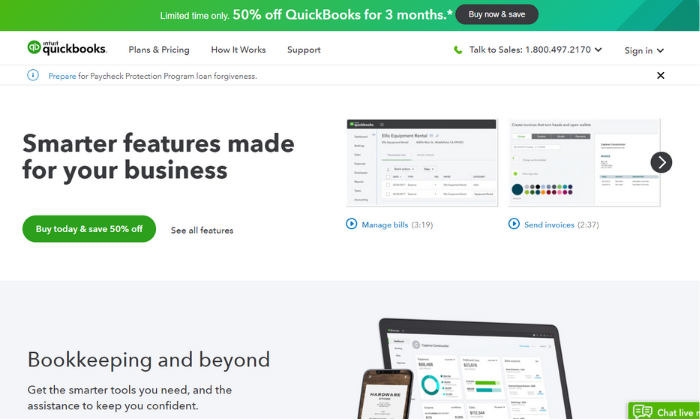
Furthermore, you can choose from cloud-based, desktop, or POS system deployment, depending on your situation. However, I highly recommend the cloud-based solution for most businesses. 

Plus, the online software integrates with apps like PayPal, Square, and Shopify to simplify cash flow management in one centralized location. 

With their online solution, you can easily access your account anywhere globally with an internet connection. Plus, you can use the mobile app to take pictures of your bills and receipts rather than filing a heap of paper receipts in your office. 

You also get access to features like:

  • Customizable invoices
  • Income and expense tracking
  • GPS mileage tracking
  • Automatic sales tax calculations
  • Bank and credit card integration
  • Expense categories
  • Standard reporting

And you can easily upgrade to an advanced plan if you outgrow the basic plan or need more advanced features. Some of their advanced features include 1099 management, inventory management, and time/attendance tracking. 

So regardless of what you need, there’s a plan to suit your needs. 
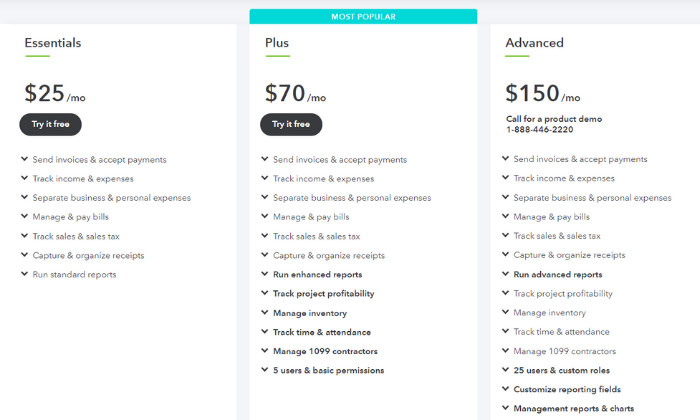
The cheapest plan starts at $25 per month. And you can add payroll services to your plan, starting at an extra $45 per month + $4 per employee per month with more advanced options available.

Furthermore, QuickBooks charges $0.25 + 2.9% for invoices, 2.4% for swipes, and 3.4% for keyed payments per transaction. Alternatively, they charge 1% for ACH transfers. And you can save up to 40% on transaction fees if you charge more than $7,500 per month. 

Like FreshBooks, QuickBooks offers a 30-day free trial OR 50% off your first three months. 

Get started with QuickBooks today!

#3 – Zoho Books Review — The best for businesses with 50+ customers/vendors

If you manage many clients and vendors, Zoho Books is one of the most affordable accounting software to consider. Their cheapest plan includes up to 50 billable clients, and they also have packages for up to 500 billable clients as well.

So, you don’t have to worry about exceeding your monthly limits. 
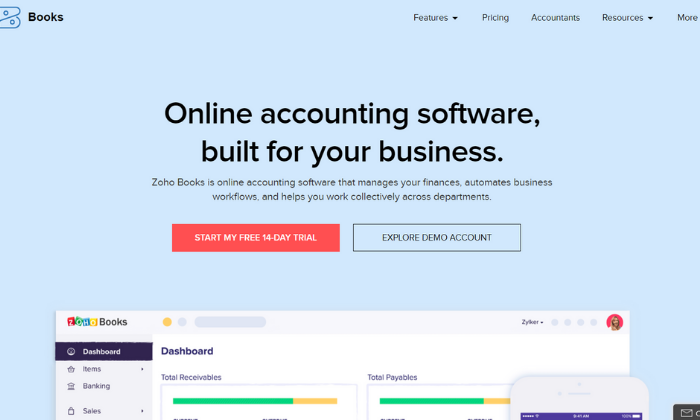
Furthermore, Zoho Books includes access to powerful features like:

  • Tax compliance tools
  • Custom quotes and estimates
  • Automatic payment reminders
  • Vendor and expense tracking
  • Inventory management
  • Automatic bank feeds
  • Time tracking
  • Customizable invoices
  • Role-based access
  • 40+ integrations

Zoho Books also offers an intuitive mobile app for managing your accounts on the go. With the app, you can track your mileage, reach out to customers, track your time, create invoices, and more. 

Each plan also includes a private client portal for accepting payments, unlimited phone and email customer support, free SSL encryption, and open rest APIs to connect with third-party applications. 

Furthermore, Zoho offers a wide range of other business tools that integrate seamlessly together. Running a subscription-based business? Or need advanced inventory management? Maybe you need extensive expense reporting for your team. 

Odds are, Zoho offers what you need. You can bundle tools together to save money and create a custom business management system for your business. 

I highly recommend starting with the Basic Plan ($9 per month) and upgrading to an advanced plan when and if you need to. The Basic Plan includes up to 50 contacts, two separate user accounts, and five automated workflows to simplify your accounting processes. 
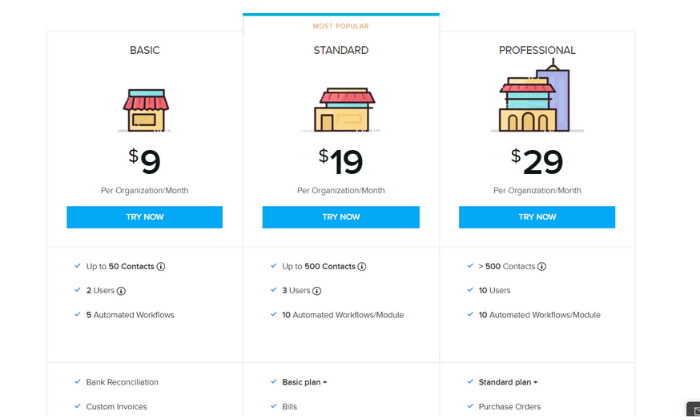
Zoho’s advanced plans include:

  • Standard — $19 per month for up to 500 contacts
  • Professional — $29 per month for more than 500 contacts

All of which are very affordable for businesses of all sizes. Furthermore, you can add extra users and 50 auto-scans for $2/month and $5/month, respectively. 

Sign up for a 14-day free trial to see if Zoho Books is right for you today!

#4 – Sage 50Cloud Review — The best desktop accounting solution

Sage 50Cloud is a desktop accounting application seamlessly connected to the cloud. So, you get the speed and reliability of a desktop software paired with the flexibility and remote accessibility of using the cloud. 

Furthermore, Sage offers cloud-based accounting software, so you’re not limited to the desktop application if that’s not your thing. However, their desktop solution is where they really shine. 
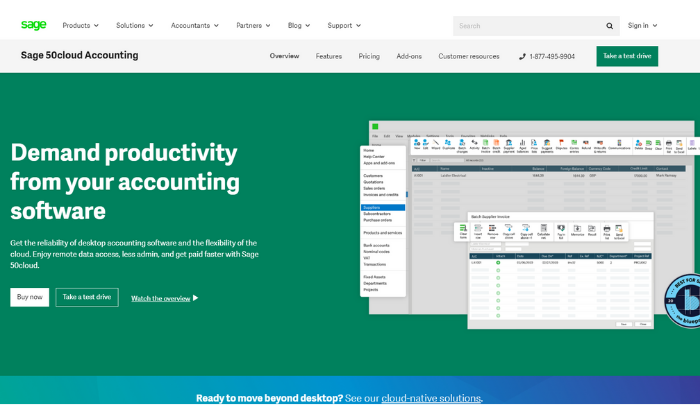
You can securely access your accounts anywhere, anytime, allowing you to work when you want and how you want. So, you’re not limited to your desktop computer despite the benefits of using desktop software. 

Plus, as the #1 rated accounting solution for small businesses, it includes features like:

  • Cash flow management
  • Flexible invoicing
  • Recurring invoices
  • Pay Now functionality
  • Accounts payable + banking
  • Automatic reconciliation
  • Advanced inventory management
  • Job and project costing
  • Payroll processing

As you can see, Sage 50Cloud includes a robust set of features you typically have to pay extra for with the other options on this list (i.e., payroll). 

And with those advanced features comes an advanced price tag. 

So if you’re looking for basic accounting software, you’re better off going with FreshBooks or QuickBooks. However, if you need these advanced features, pricing starts at $50.58 per user per month. 
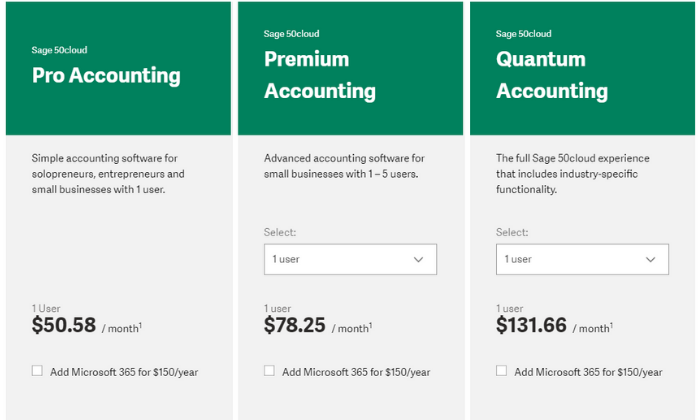
Their paid plans include:

  • Pro Accounting — $50.58 per month for simple accounting
  • Premium Accounting — $78.25 per month for advanced features
  • Quantum Accounting — $131.66 per month for all features

However, you can save a bit more by choosing an annual plan and paying in advance. Additionally, you can subscribe to Microsoft 365 for an extra $150 per year. 

You can try Sage’s cloud-based accounting software free for 30 days with no installations and no credit card required. After that, you can purchase Sage 50Cloud if it’s a good fit for your business. 

Get started today!

#5 – Wave Review — The best free accounting software

If you have a tight budget or need a simple accounting solution, Wave is an excellent choice. It’s an award-winning finance software for entrepreneurs and businesses of all sizes. 

Plus… their accounting features are entirely free with no hidden fees or monthly payments. However, they charge a standard transaction fee of 2.9% (3.4% for American Express) + $0.30 for credit cards and 1% for ACH transfers. 

You can also add payroll services starting at $20 per month. But accounting, invoicing, and receipt scanning are all free forever. 
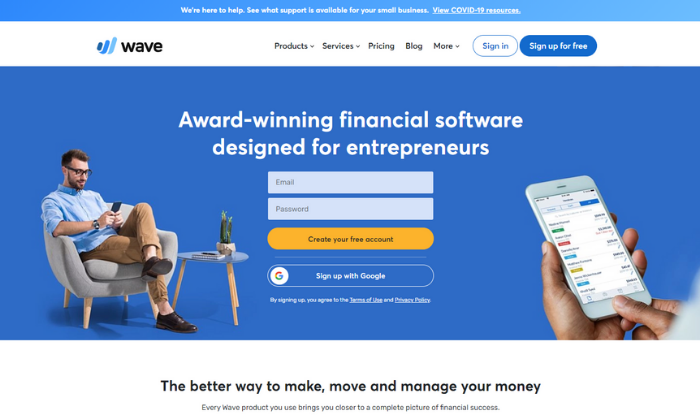
This free accounting software includes features like:

  • Unlimited income and expense tracking
  • Unlimited collaborators and accountants
  • Double-entry accounting system
  • Powerful reporting and analytics
  • Bank + credit card connections
  • Tax categories
  • Recurring invoices
  • Automatic payment reminders
  • Unlimited receipt scanning
  • 2-business-day payouts

Plus, you get unlimited email support, as well. And if you’re wondering how Wave stays in business, it’s through their transaction fees and payroll services. So, yes. The software really is free forever, with no hidden fees. 

Furthermore, you can download Wave’s mobile app to access and manage your accounts on the go from anywhere with an internet connection. 

Sign up for a free account to get started today!

Summary

I recommend FreshBooks (for freelancers and individuals) or QuickBooks (for small teams). These two solutions are suitable for most users. They’re incredibly affordable, easy to use, and scalable. Plus, they include all your essential accounting features.

And if you’re on a tight budget, Wave is an excellent free alternative. 

However, the best accounting software for you depends on what you need and what you can afford. So, feel free to use the characteristics we talked about as you go through the process of choosing the right software for your business. 

What’s your favorite accounting software?

The post Best Accounting Software appeared first on Neil Patel.


from Blog – Neil Patel https://ift.tt/31SlWUT
via IFTTT

How a Simpler Website Can Improve User Experience

How a Simpler Website Can Improve User Experience written by John Jantsch read more at Duct Tape Marketing

Marketing Podcast with Michael Reynolds

Michael ReynoldsIn this episode of the Duct Tape Marketing Podcast, I interview Michael Reynolds, President and CEO of Zephyr CMS.

Michael has had several entreprenural journeys including a Principal at Elevation Financial and Co-Founder at Inboud Back Office. Like many other small businesses, his team struggled with deploying high-performing, compliant, beautiful sites. Existing content management systems are often based on technology and code that’s over a decade old. Existing CMSs weren’t built for the demands of today, nor for the incredible technology we now have to deploy websites.

This is how Zephyr CMS was born. Listen to this interview to find out more about Zephyr and how simplifying your website can improve your user experience.

Questions I ask Michael Reynolds:

  • How does Elevation fit into your entrepreneurial work?
  • Are there any trends for 2020?
  • What design trends are you seeing on websites?
  • Is WordPress the default?
  • What does a simpler site look like?

What you’ll learn if you give a listen:

  • How creating several businesses created the need for a new simple CMS tool
  • How the trend is moving towards simplicity on websites
  • How to add simplicity, think flatter, take more away and pull people in faster
  • How to simplicity can benefit the user experience

More about Michael Reynolds:

Like this show? Click on over and give us a review on iTunes, please!


Less Annoying CRM logo


Less Annoying CRM AwardThis episode of the Duct Tape Marketing Podcast is brought to you by Less Annoying CRM.

Less Annoying CRM is a simple contact and lead manager built from the ground up for small businesses. Manage your contacts, leads, notes, calendar, to-do’s and more, all from one simple web app. Less Annoying CRM is founded on three core principles: simplicity, affordability, and outstanding customer service.

Less Annoying CRM has a special offer just for listeners of Duct Tape Marketing Podcast.  All users get an unlimited 60-day free trial to exhaustively test every aspect of the CRM. There is no prepayment or obligation to try it out. https://www.lessannoyingcrm.com/hello/ducttapemarketing


from Duct Tape Marketing https://ift.tt/3gT1kA2
via IFTTT

Why reviews are so much more than social proof

Why reviews are so much more than social proof written by John Jantsch read more at Duct Tape Marketing

Online reviews are a crucial part of marketing these days. The presence of lots of great reviews provides a layer of proof that you keep your promises.

But often overlooked in the obsession for 5-star reviews is the actual words used by the reviewers. A 5-star review often implies that this is an ideal customer. They had the right problem, you solved it wonderfully, and they had a great experience.

Then, they voluntarily turned to a 3rd party review site such as Google, Facebook, or Yelp and told the world how great you are – effectively referring your business to anyone who cared to read the review.

You want more of those ideal customers, don’t you?

Here’s the real point – if you want more customers like the ones leaving great reviews you should pay very close attention to how they talk about your business – in particular, the words and phrases that show up repeatedly.

There’s gold in those phrases as it’s essentially your best customers telling you over and over again exactly what it is that you do that solves the real problem they have.

Here’s a real-life example of excerpts from some reviews for a local business to drive this point home.

  • “They came and worked as scheduled and cleaned up nicely after it was done.”
  • “The guys showed up on time and did a wonderful job.”
  • “In the past, we have dealt with people who don’t show up or do a professional job. Everything was cleaned up very well.”

Do you spot a pattern here? It’s not ever clear from these excerpts what service this business provides, but the clues to how they provide it are obvious.

The core message this business should put at the top of the fold on their website is – “We promise to show up when we say we will and clean up everything before we leave.”

It turns out this business is a tree service, but the real problem they solve for their ideal customers is that so few people in the home services industry are organized enough to offer appointment times and often leave a mess behind when they leave.

For this business and so many others that I’ve worked with over the years, reviews are a strategic marketing asset as much as a vehicle for social proof. Mine them for your core message and they will become a tool to help you attract even more ideal clients.

The process of review research is pretty simple.

Turn to your reviews on Google, Facebook, or any industry-specific review sites and start carefully reading your positive reviews. (Negative reviews can tell you a lot as well, but for now, that’s not what we are looking for.)

As you read the reviews start noticing words, phrases, themes, and patterns that are repeated. This is your customer explaining the problems your company solves for them, the things you do that others don’t, these are the words, phrases, and themes you need to start using in your marketing message right now.

Sometimes you’ll discover that your happy customers simply love your people or your approach. That’s great, don’t discount how powerful this can be as a message. In some cases, you’ll uncover a complete and creative core message hidden inside a review.

A few years ago we were working with a subscription-based lawn mowing service that attracted busy professionals as their ideal customers. After culling through their reviews we spotted the following in several reviews – “I just love coming home on mowing day.”

So it seems that the problem this company solved was that they were very professional, did a great job, and could be relied upon to do what was promised, but the ideal customer expressed this as experiencing a moment of joy in an otherwise hectic world. That’s kind of magic.

So they began to promise that – “You’ll love coming home on mowing day” – begging prospects to wonder if that’s true for them with their current service.

Using reviews to develop a core message of difference – one that offers precisely what your ideal customers value is how you turn a simple review into a powerful marketing strategy. But, you can also often find a handful of recurring themes that make great blog posts topics, FAQs,  emails subject lines, and ad copy for your Google Ads.

It’s all about using the words of your ideal customers to attract more of the same.

Now that you have this review thing down let’s expand it a bit. Studying reviews is also amazing for competitive research. Finding themes in both the negative and positive reviews of your toughest competitors can provide a sales advantage or spark an idea or two about some things you could do better based on some of the reviews you read.

Reviews and the words they contain are more than social proof, they’re amazing content and a path to better messaging in your marketing.


from Duct Tape Marketing https://ift.tt/3lJvFEU
via IFTTT

How to Set Up Microsoft Bing Shopping Campaigns for Ecommerce Businesses

Google may lead the search engine ranks, but they’re not the only player in the game.

Bing holds 11.22% of the global search engine market share. Compared to Google’s 72.94%, that may not seem like much — but with upwards of a third of US desktop searches coming from Bing (and Bing-backed AOL and Yahoo), it’s pretty huge.

For ecommerce businesses, that makes Microsoft Shopping Campaigns (formally known as Bing shopping campaigns) a killer opportunity to boost your bottom line.

NOTE: Bing now refers to all platforms related to their shopping ads by the Microsoft name. For example, what was once called the “Bing Merchant Center” is now the “Microsoft Merchant Center.”

Bing Does Not Equal Google, but That Could Be a Good Thing

Long story short: Your paid media strategy deserves diversification, and Bing is the place to find it.

Why?

Because Bing offers unique demographics you may not be able to target from Google Ads.

More than 70% of Bing users are over the age of 35. At the same time, nearly 40% of Bing users have a six-figure annual household income. The company reports a good chunk of their user base comes from the South Atlantic region of the US (which includes various states from Delaware to Florida, plus Washington DC) — but they also have a stronghold across North America, Latin America, China, and more. 

If you are looking for high earners in a particular region, Bing could be your gateway into a lucrative ecommerce market.

Bing has some other perks too, like:

  • Affordable cost-per-click: Bing competition is significantly less than Google, with one ReportGarden study sharing the average cost-per-click for Bing Ads is just $7.99, while the average Google Ads cost-per-click costs more than $20. Of course, this depends on the industry — but a 250% price increase is nothing to ignore. 
  • User-friendly design: You don’t have to be a digital marketing pro to use Bing Shopping (though you may feel like one after you’re all set up.) You can easily craft ecommerce ad campaigns across platforms (Google included) to reach a wider audience.
  • Targeting differentiation: On Bing, you can target the device (desktop, smartphone, or tablet), operating system, timezone, and more. (Google allows similar targeting, but the options are far more limited.) 
  • An in with major websites: AOL and Yahoo both use Bing to power their search engines. This benefit provides Bing shopping marketers with a combined 700+ million unique monthly visitors from these two websites alone. Additionally, Amazon’s Alexa currently uses Bing for web searches.

When used in tandem with Google Ads, Bing can diversify your paid media campaigns for all kinds of ecommerce products. 

For more information about paid shopping and product campaigns, check out this video and the eCommerce Unlocked series on my YouTube channel:

How Does Bing Shopping Work?

When a user searches a branded or non-branded keyword on Bing, they’ll receive a grid of shopping results from various ecommerce platforms, which are usually from big ecommerce giants like Amazon and small businesses with compelling offers and inventory.

If the user has their location tracking turned on, Bing will refine the results by adding products they can find locally.

example of a bing shopping campaign ad -- How to Setup Microsoft Bing Shopping Campaigns for Ecommerce Businesses

Bing “hiking boots” search query

Depending on your layout, these ads might show up as a vertical grid on the SERP’s right-hand side.

As an ecommerce marketer, your Bing shopping campaigns can give you valuable real estate above the fold.

And it may just put you in contact with a whole new audience while you’re at it.

How to Set Up Your Bing Shopping Campaigns

First things first: Create your Microsoft Merchant Center account

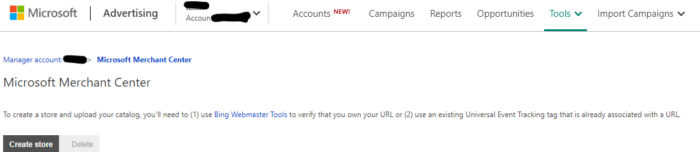
You can do this by logging onto your Microsoft Ads (formerly known as Bing Ads) account, click the “Microsoft Merchant Center” button, and create an account. You’ll need to verify your store with a destination URL, which may take up to 48 hours.

set up bing microsoft shopping account

Once that’s done, follow the steps below. 

Create an Up-To-Date Shopping Catalog

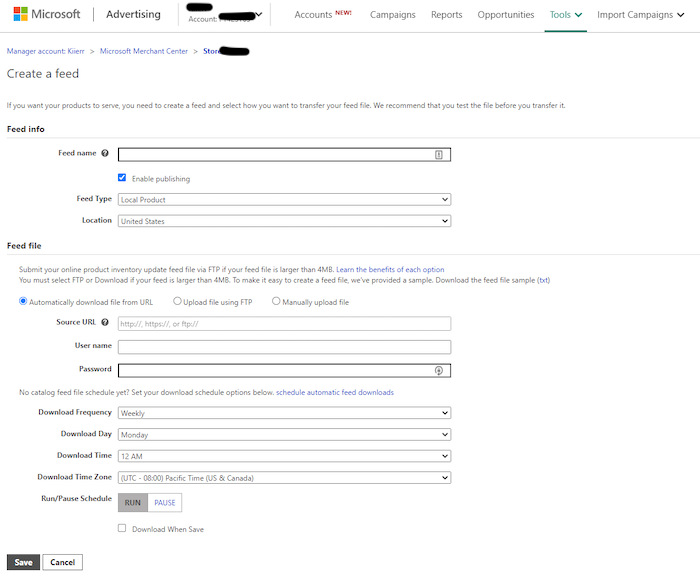
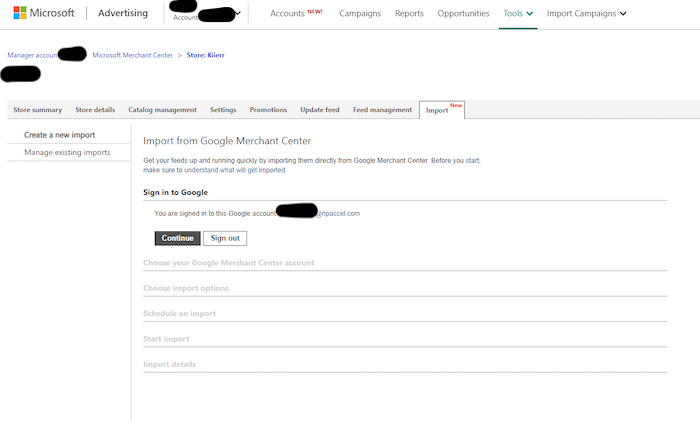
A shopping catalog (or shopping feed) is where your products live. You can either import your existing shopping feed from Google Merchant Center or create a brand new one. You can upload any new catalogs to your Microsoft Merchant Center.

Import ecommerce product feed into microsoft bing merchant center account

When creating a new feed, don’t forget to set up all of your product attributes.

There are mandatory product attributes (like title, link, price, description, product identifiers, and more), but there are also some optional ones (like color, gender, material, and size).

Add as many as you can because this info helps you connect with users in your target audience. That will help improve your conversion rates —  which is always a good thing.

Create an Audience

Creating a custom audience tells Microsoft and Bing who you want to reach. Aim to create a narrow audience, so you don’t waste ad spend on people outside your target audience.

On your Microsoft Advertising account, head to “Shared Library.” Under the audience header, you’ll click “View Audiences.” This section is where you can lay out your ad’s plan of action once it’s live.

Create a Campaign

From your Microsoft Merchant Center, click Create Campaign. Then click Sell Products.

You’ll adjust your campaign settings, like setting priority levels for each of your Bing shopping campaigns.

Priority levels can be high, medium, or low. The higher priority campaigns take precedence, so set your important campaigns with a bigger budget on high priority while leaving your runner-ups on medium or low.

Organize Your Product Groups

You can organize based on various attributes you’ve given to each product. This feature helps with targeting.

Turn on Automatic Item Updates

This option ensures your ad prices always reflect your website prices, and you’re not advertising products that you’ve already sold. A new consumer isn’t going to give your shop a second look if prices are off or you’re promoting out of stock items.

Instant updates also help you avoid wasting your budget. 

Use Custom Labels to Streamline Audience Targeting

Head to the “Labels” on your product feed in your campaign editor. You can organize campaigns, keywords, ad groups, and ads in a way that works for you.

While it won’t directly impact your Bing ads, this does help you better analyze your campaigns and improve future targeting. That can boost future campaigns and help you optimize existing ones.

Need a more hands-on guide? Microsoft has a training course for newbies.

Tips and Plugins to Optimize Your Bing Campaigns

Why settle for average when your ecommerce shop can run the Bing shopping game?

Try these tips and tricks to optimize your Bing ad campaigns and maximize your ad dollars. You can also view my free PDF of Bing Ads resources.

Import Google Ads to Bing Shopping Campaigns

It may seem like magic, but you can import your shopping campaigns to Bing straight from Google Ads.

All you have to do is make sure your website is set up on an ecommerce platform (think Shopify and the like.) Then, ensure your Google Ads shopping feed and campaign are up and running.

Once you create your Microsoft Merchant Center store and verify it, you can import your campaign using Microsoft’s Google Merchant Center (GMC) Import tool.

import google shopping campaign into microsoft bing shopping campaign

Then, tick the option that allows you to sync the two platforms to keep everything updated.

Universal Event Tracking

Universal Event Tracking (UET) is a Microsoft tool that helps track the sales and conversions that stem directly from your Bing shopping campaigns. 

Events are consumer actions like clicks throughs, add to carts, and purchases. You can track which events matter most to you and follow the consumer’s path from start to finish.

This tracking will help you understand how much revenue you can attribute to your Bing ads. The process includes applying a UET event tag and short web coding to record the conversions as they come.

Use Microsoft’s how-to guide for implementing UET for your Bing shopping campaigns.

Microsoft Ad Extensions

To help businesses of every kind (including you ecommerce folks), Microsoft has developed a series of ad extensions for Bing shopping campaigns.

What are my favorite extensions for ecommerce businesses?

Well, since you asked:

  • Sitelink extensions: Sitelinks are a cool tool that sends ecommerce customers straight to the right page. Word on the street is that you can’t actively control these on Google, so take advantage of this in Bing ads.
  • Image extensions: Add relevant images to your Bing ad using image extensions.
  • Review extensions: Show average reviews for your ecommerce products, right on the ad.
  • Price extensions: List your competitive price to lure in consumers from the SERP.
  • Action extensions: Add a call-to-action to your campaign that’s clear, concise, and action-oriented.

Shopify Ecommerce Store Integration

If you use Shopify to run your ecommerce store, you can integrate it directly with Bing Shopping.

Use the Shopify app to streamline analytics and keep all your data in one easy-to-access place. 

Shopify is especially helpful for ecommerce teams who want collaborative access to Bing shopping campaign info. But regardless of how many people you have on your side, it’s undoubtedly beneficial for Shopify store owners.

Set up Bing Remarketing Audiences

Remarketing is a process that lets you target consumers based on their prior web actions.

Keep in mind, if you import Google shopping feeds over to your Microsoft Merchant Center, you can’t import your remarketing data. That means whether you’re importing or starting campaigns from scratch, you’ll need to set up remarketing audiences manually.

Start with your existing audiences in your Microsoft Advertising platform.

You’ll also want to make sure you’ve set up UET tags and coded them into your website. This tagging makes sense considering you’re basing it off of the customer’s previous actions, so you need to track them.

Once you hit the “Audience” page, click “Create a remarketing list.”

From there, create a tag and configure the settings as you see fit. And whatever you do, don’t forget to save!

Use Local Inventory Ads For Storefronts

Bing’s local feature is pretty cool. It shows your ads for localized product queries, including cities, states, or phrasing such as “near me.” 

So if your ecommerce business also has a local storefront, set up Local Inventory Ads to maximize reach. 

All you have to do is provide your shop’s physical location, upload and submit product info, keep your inventory updated, and enable your Microsoft Shopping Campaigns.

Conclusion

There’s no denying Google‘s prowess, but ecommerce advertisers should consider Bing campaigns as well.

Adding Bing shopping campaigns to your marketing repertoire is an easy way to diversify your paid advertising.

Is your ecommerce business ready for an adventure into the world of Bing shopping?

The post How to Set Up Microsoft Bing Shopping Campaigns for Ecommerce Businesses appeared first on Neil Patel.


from Blog – Neil Patel https://ift.tt/2QP9Ohk
via IFTTT

6 Dynamic Tactics For Solving The Post-Pandemic Marketing Rubik’s Cube

Extra complicated Rubik’s cube image.

Extra complicated Rubik’s cube image. What will successful B2B marketing look like in a post-pandemic world, and what can marketers do today to be ready? B2B marketers are facing daunting and unprecedented challenges — not unlike a Rubik’s Cube — during the global health crisis. Each impediment, however, also offers valuable lessons that can help us as we transition to 2021 and the future opportunities that await. Let’s begin unraveling the mysteries of the post-pandemic marketing world, with six dynamic tactics B2B marketers can use today to prepare for the future business landscape.

1 — Influencer Intensification: Subject Matter Experts

Influencers Image Post-pandemic marketing will likely feature a noticeable intensification when it comes to the use of B2B influencers. As one of the most pandemic-proof marketing practices during the global health crisis, B2B influencer marketing is poised to continue growing in 2021 and beyond, due in part to the value industry experts bring to everyone involved. “Traditional marketing channels are drying up and even trade shows are imperiled in 2021,” Mark Schaefer, chief operating officer at B Squared Media observed. “The influence marketing trend will be amplified as businesses seek trusted voices to join industry conversations,” Mark added. Mark's prediction is among dozens of insightful influencer marketing statistics in our recent 2020 State of B2B Influencer Marketing Research Report, and the following data points speak to the strength of industry influencers and point to increased use as we move into 2021:
  • 90% of B2B marketers expect their influencer marketing budget to increase or stay the same
  • 78% of B2B marketers believe prospects rely on advice from influencers
  • 74% of B2B marketers say that influencer marketing improves customer and prospect experiences with a brand, and 90% plan to increase their budget in the near future
  • 63% agree that marketing would have better results if it included an influencer marketing program
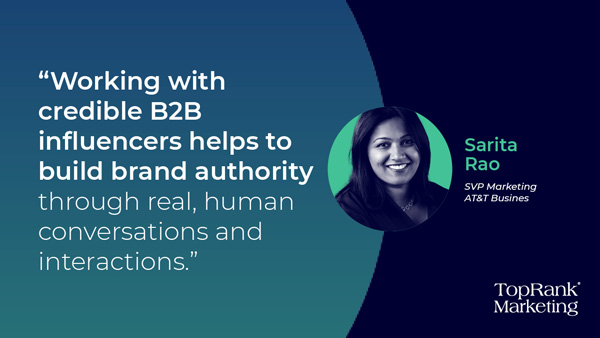
“Digging into the results, one can quickly see a trend in B2B marketers who are optimistic about influencer marketing yet not confident about their ability to execute,” Shama Hyder, chief executive at Zen Media recently observed in her Forbes interview with our co-founder and chief executive Lee Odden, “New Report Says B2B Influencer Marketing Still Has Massive Room For Growth.” “With the pandemic causing a loss of in-person B2B tactics — field marketing, in-person trade shows, and experiential marketing efforts, for example — much of where buyers focus for information are digital channels,” Lee noted. “This is exactly where influencers provide valuable and trusted perspectives. Trust, reach and engagement are always challenges for B2B brands, and collaborating with trusted industry experts that have the attention and respect of buyer audiences has proven to be an effective solution,” Lee added — a sentiment also expressed by Sarita Rao, senior vice president of marketing at AT&T Business*. [bctt tweet="“Working with credible B2B influencers helps to build brand authority through real, human conversations and interactions.” — @saritasayso of @ATTBusiness" username="toprank"] Sarita Rao Image According to research conducted by Forrester the pandemic has seen new opportunities for influencer marketing, as 63 percent of U.S. consumers have spent more time using social media platforms, 58 percent have noticed more content from influencers, and 51 percent have had a positive attitude about influencer content and found it valuable. Additionally, between March and July 2020 sponsored influencer posts saw a five-fold increase in interactions, reaching 57 million in July, according to report data from Shareablee. Among U.S. and U.K. consumers who follow social media influencers, 72 percent said they have spent more time using social platforms during the pandemic, and 64 percent also said that they are likely to continue the same level of usage during post-pandemic times, according to GlobalWebIndex survey data. Aside from its resilience during the pandemic, influencer marketing has for some time been poised to see more mainstream B2B usage, a move that is likely to steadily increase in our post-pandemic marketing world. To learn more about B2B influencer marketing or beginning a pilot program, here are six additional recent resources we’ve compiled:

2 — Persistent Programs: Always-On Marketing

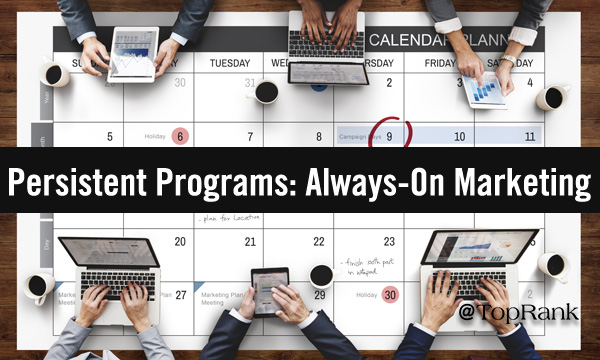
Always-On Image Studies have shown the increased effectiveness of always-on marketing programs that replace one-and-done single-use campaigns with ongoing efforts that match the always-on nature of today’s consumer. The case for a post-pandemic shift to always-on marketing programs is bolstered by compelling recent data from our report, such as:
  • 76% of B2B marketers find that the strategy of working with influencers through always-on engagement or when combined with campaigns delivers results
  • 75% saw increased views of brand content using always-on influencer marketing
  • 60% saw an increased share of voice, 55% saw more media brand mentions, and 50% saw increased brand advocacy through always-on influencer marketing
  • 89% of B2B marketers using always-on influencer programs expect their budgets to increase or remain the same, versus 73% for marketers running traditional campaign-based programs
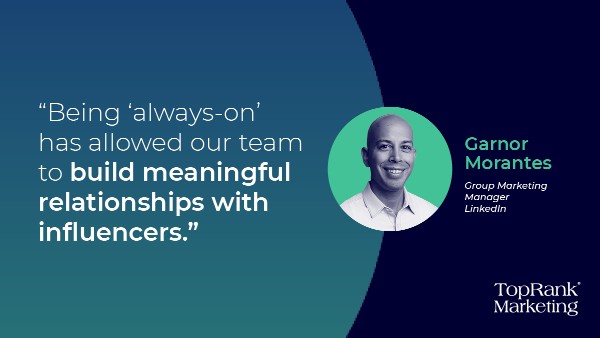
This all points to persistent B2B marketing programs becoming more widespread among successful B2B marketers in the post-pandemic era, and it’s easy to see why, as the partnerships formed through always-on programs build ongoing brand credibility and trust that can be difficult or impossible to achieve using one-and-done campaigns. [bctt tweet="“With brand trust at a low, it’s important for B2B companies to invest in relationships with credible experts that buyers do trust.” — Lee Odden @LeeOdden" username="toprank"] If you’re looking to learn more about why always-on programs achieve better results and how you can implement them, check out the following recent articles we’ve written about a topic that will only become more important in 2021 and beyond: [bctt tweet="“Being 'always-on' has allowed our team to build meaningful relationships with influencers.” — Garnor Morantes of @LinkedIn" username="toprank"] Garnor Morantes Always-On Influence Quote

3 — Shifting Search: New Challenges & Opportunities

Search Image Like blowing dunes, the sands of the search technology landscape change often, and in the post-pandemic environment marketers will see a shift as Apple seeks to make inroads with its own search experience and whittle away at Google’s long-standing dominance. Paid and organic search marketing efforts are a vital part of most B2B firms’ strategy, and pandemic or not these efforts would have continued for the majority of businesses. The global health crisis has given us a newfound appreciation of the importance of findability and how valuable a sound search plan is for businesses today, and this will continue into the foreseeable future. Search strategies no longer involve only a website and traditional search engines, as more people than ever also search for answers and information from within social media platforms’ own often-lackluster search mechanisms, which some see as presenting new challenges, as well through the increasing use of voice search. 66 percent of B2B chief marketing officers said that their 2021 budgets would see an increase in spending on search engine optimization (SEO), with the same percentage also planning to boost spending on paid search, according to Gartner’s annual CMO spending survey. Marketing Charts Image [bctt tweet="I expect a growth in importance and usage of structured data, an increase in predictive search features, and a shift to a more technical SEO ecosystem. @aleyda" username="toprank"] Recently I took an in-depth look at why search is more important than ever, in “SEO Strategy: 5 Reasons Why It’s More Important Than Ever For B2B Marketers,” and we’ve also explored other aspects of SEO in B2B marketing in these articles:

4 — Virtual Variations: Social VR Landscapes

Social VR Image This year the world has spent more time using both traditional social media platforms and social virtual reality worlds, and when our lives return to some semblance of normal, all flavors of VR will seek to capitalize on an audience that — although no longer captive at home — has come to know and expect that brands use the technology. 51 percent of U.S. adults have increased their use of social media during the global health crisis according to eMarketer, and nearly a third have spent an additional one to two hours of time on social platforms during the pandemic, leaving more time for audiences to explore the new virtual worlds being created by social firms, such as Facebook’s Horizon VR experience. “The convergence of both the physical and virtual worlds will create new opportunities in the future in the way friends, families, and even colleagues connect,” Cathy Hackl, author and futurist recently noted in Forbes. By 2022 some forecasts predict over 95 million augmented reality (AR) users in the U.S. alone, including over 60 percent using VR with more than 30 percent using VR headsets, a trend that savvy B2B marketers are keeping a close eye on for post-pandemic marketing spending. eMarketer AR/VR Image Other survey data has shown that 39 percent of B2B professionals expect to install new AR and VR technology in the next 12 months. With in-game, AR, and VR marketing opportunities seeing greater interest in 2021 and beyond, B2B marketers can learn more about the importance of experiential storytelling in the following pieces we’ve written about these and related subjects:

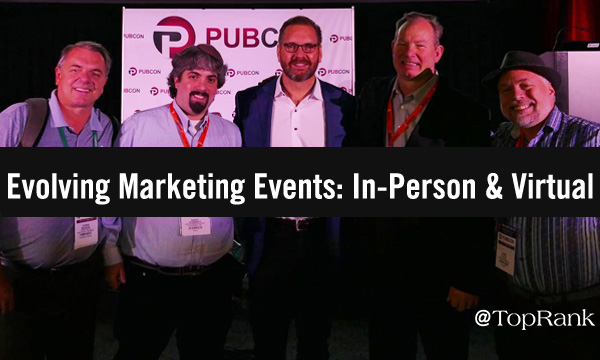
5 — Evolving Marketing Events: In-Person & Virtual

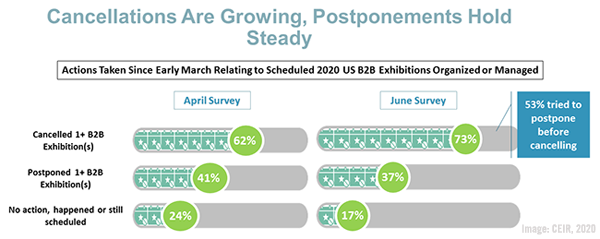
Events Image How will marketing events change in a post-COVID19 world? There’s no question that in-person marketing events are win-win experiences for the many parties involved, from speakers and attendees to exhibitors, sponsors, and others, yet during the pandemic creative new takes on virtual conferences have presented viable alternatives that are likely to be with us for good, continuing to augment in-person events once the health crisis ends. The pandemic has seen Facebook begin offering paid event options for businesses, with direct in-stream purchases available for eligible Facebook business pages in 20 countries including the U.S., offering digital marketers new monetization and event marketing options. Virtual events help traditional in-person conferences expand their reach and gain new online audiences — people who may eventually also attend an organization’s physical events. Similarly, in-person events such as marketing conferences may — in post-pandemic times — serve as good examples for some of the purely virtual events that have come into existence this year out of necessity, pushing them to begin their own new physical events. 92 percent of marketers have said that they believe putting on successful virtual events will be important until the pandemic ends, and some brands have already chosen to postpone or cancel their events all the way through the middle of 2021, including major players Facebook and Microsoft. 73 percent of B2B event organizers have had to cancel a physical event because of the pandemic, and 81 percent have provided virtual alternatives, according to survey data from The Center for Exhibition Industry Research (CEIR). 2020 July 24 CEIR Chart The time is bound to arrive when in-person events return, however, and smart B2B marketers will be prepared to incorporate both virtual and physical conference experiences for learning, networking, and selling. Having an influencer marketing strategy makes sense for taking full advantage of both virtual and in-person events. “Partnering with influencers is more important now than it ever has been,” our president and co-founder Susan Misukanis explained. “Targeting the right influencer communities can be the best way to expand virtual event attendance and reach into a broader audience — who may not have planned to travel to your live event or conference,” Susan added. [bctt tweet="Partnering with influencers is more important now than it ever has been. Targeting the right influencer communities can be the best way to expand virtual event attendance and reach into a broader audience.” @smisukanis" username="toprank"] To level-up your event game for both virtual and physical conferences, here are six articles we’ve published to help:
6 — Delivery Diversity: New Communication Channels

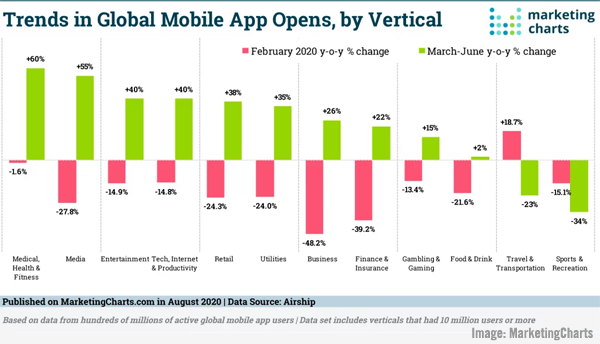
Communications Image The pandemic has both driven us apart and brought us together in new ways, and given us creative methods to both tell and hear compelling digital stories. New communication channels have arisen, such as the virtual worlds of Facebook’s Horizon and others we’ve already explored, along with the huge rise in online video communication through Zoom, Slack, Google Meet, Microsoft Teams and others. The mass turn to video conferencing has also helped drive a large increase in both mobile app usage and advertising spending, highlighting the importance of making mobile a part of any well-rounded B2B marketing strategy. Engagement among mobile ads has climbed by some 15 percent during the global health crisis according to survey data, and despite an overall drop in ad spending for the year, mobile ad spend has fared the best, as its 15 percent decrease was less than the 25 percent seen for desktop ad buying, according to additional data. Business app opens saw a 26 percent year-over-year increase from March through June, report data shows, as seen here. Marketing Charts Image B [bctt tweet="“We’re all the same size rectangle on the Zoom screen.” — Vanessa Colella of @Citi" username="toprank"] A rare pandemic silver lining is how we’ve all found new ways to communicate and  — more importantly — the stories we’re telling. Storytelling will be key in the post-pandemic marketing landscape, and to help you weave authentic messages that audiences will remember here are six recent articles we have available on this important topic:
Don’t Forget Your B2B Marketing Gravity

via GIPHY The post-pandemic world will see intensified use of B2B influencer marketing, the growth of always-on programs, shifts in the world of search, more social VR, the evolution of events, and new communication channels, and we hope that by exploring these areas here your future marketing efforts will achieve newfound success — even if you’re no closer to solving that Rubik’s Cube. Succeeding in any of these areas takes considerable time, effort and experience, which is why many firms choose a top marketing agency like TopRank Marketing. Contact us and find out why firms including Adobe, LinkedIn, AT&T, 3M, Dell, Oracle, monday.com and many others have chosen us for award-winning marketing. * AT&T Business is a TopRank Marketing client.

The post 6 Dynamic Tactics For Solving The Post-Pandemic Marketing Rubik’s Cube appeared first on Online Marketing Blog - TopRank®.


from Online Marketing Blog – TopRank® https://ift.tt/2QP6UZT
via IFTTT

What Flowers and Fruits Can Teach Us About Content and Branding

Content marketing and branding go farther back than you might think. Although many of us think of consumerism as an invention of the modern mind, the truth is that the natural world invented it long before us humans.

The world’s earliest examples of branding date back to hundreds of years before the golden age of advertising — long before humans could write, in fact.

Surprising as it might sound, some of the first forms of branded advertising were flowers and fruits. To encourage animals to help distribute their seeds and pollen, plants created brightly colored “advertisements” in the forms of apples, peaches, tulips and orchids. Over time, each of those plant species became a successful “brand” that still attracts customers today.

In the same way, birds and insects were some of the world’s first brand-conscious shoppers. Hummingbirds, for example, consistently prefer different flower “brands” than bees do.

Even in digital marketing, we still use food-related language — hoping audiences will “consume” our products if we match their “taste.”

Metaphors like these contain a surprising amount of truth about our customers — from the ways they discover new products, to the reasons they get turned off by others, and even the rhythms in which they seek out familiarity or novelty.

Here’s how this natural framework can help you cultivate more fruitful customer relationships.

Customers experience their first taste differently depending on mood.

As any parent of young children can tell you, it’s often a challenge to talk your kids into trying new foods — especially when those foods are weird-looking vegetables. But while some parents resort to the old formula of “Because I told you so,” I’ve gotten much better results by carefully choosing the right moments to serve up healthy foods.

Our moods influence much more than just our willingness to sample new veggies. Psychological research shows that our emotional state can actually change the way many foods taste. When we’re in a pleasurable mood, chocolate and fruit taste sweeter and richer — while, when we’re stressed, sour and bitter flavors seem to take over the whole palate, potentially ruining our dining experience.

By this same logic, your subscribers’ experience with the products you’re promoting owes as much to their emotional states as it does to the quality of your content. Catch them at a moment when they’re already stressed, and they may reach for the “Unsubscribe” button. Reach them at moments when they’re emotionally receptive, and you’ll find they’re far more open to expanding their tastes — and will experience your products with much more receptive palates.

Even if a customer enjoys their first taste, they may not want a repeat.

We’ve all had the experience of sampling a pungent spice or an unusual piece of sushi, and thinking, “Well, I’m glad I tried that — but I never want to taste it again.”

In other words, the mere fact that we like to try new foods doesn’t necessarily mean all those foods will end up on our weekly menu or will open up whole new categories of culinary exploration. Sometimes we just want to taste, savor the experience of trying something new, and move on.

This universal human tendency makes it clear why repetitive “You might also like…” recommendations rarely speak to customers’ actual desires. The fact that I’ve just tried raw sea urchin doesn’t mean I now want to eat sea urchins for breakfast tomorrow — nor does a customer’s purchase of stiletto heels mean she’s suddenly become a designer shoe collector.

Instead of rehashing the purchases your customers made yesterday or last week, your marketing automation software should be able to predict what those purchases imply about each shopper’s taste tomorrow. Maybe a customer’s high heel purchase means she’s just landed a new job — or that she’s got a glamorous event to attend. Those insights should drive your next round of recommendations.

Customers grow more open to new tastes when the overall diet is tasty.

Just as kids are likely to enjoy new foods when you catch them in the right mood, they’re also far likelier to give a new food a chance if your previous recommendations have turned out to be delicious. When every new dish contains another mushy vegetable, kids may turn up their noses at dinner — but if they loved the colorful fruit you served them for lunch, they may be more willing to give peas a chance.

Your customers’ content diets follow the exact same principle: establish a reputation for serving up meaningful, relevant recommendations, and your subscribers will grow more receptive to products that fall slightly outside their usual tastes.

And if they don’t respond to a product suggestion this time, try waiting a few days, then offering it in a different context. Over time, your customers will learn that your content diet is a reliable source of tasty recommendations — and they’ll keep coming back to your brand, as surely as bees return to flowers every spring.


Customer data helps you better understand your audience’s tastes and preferences. See how to “Go Further with Data Management.”


from Oracle Blogs | Oracle Marketing Cloud https://ift.tt/3lI9FdK
via IFTTT